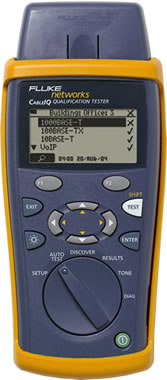
Clearing identifying information from a CableIQ™ Qualification Tester The CableIQ Qualification Tester incorporates non-volatile memory for storage of test results. Non-volatile memory is memory whose contents are retained when power is removed. This memory can be sanitized to remove previously stored test results. The sanitation process for this memory follows.
- Turn the CableIQ tester dial to RESULTS
- Press the F2 function button (waste can icon)
- A "Delete Results" screen will appear allowing deletion of selected tests or all tests. Use the down arrow and highlight Delete All Tests (the bottom-most entry)
- Press the F2 function button (the waste can icon)
- Press the F1 function button (Yes, delete all tests?)
- Turn the CableIQ tester dial to SETUP
- Use the down arrow and highlight Factory Settings
- Press the F1 function button (Select)
- Press the F1 function button (Yes, set unit factory Autotest and NVP settings?)
- Turn the CableIQ tester dial to SETUP
- Use the down arrow and highlight User Information
- Press the F1 function button (Select)
- Use the down arrow and highlight a user information field
- Press the F1 function button (Edit)
- Press the F2 function button (Del) multiple times to clear the field
- Press the ENTER button when cleared.
There is no backdoor feature to recover these settings/results once steps 1 thru 16 have been completed.