
Introduction
CopperPro Reporter Version 2 automates the process of generating test results reports. It extracts stored test results from the CopperPro automated test sequences and uses that data to populate an Excel spreadsheet.
Once in Excel format, what you do with the data is limited only by your imagination. Keep it on your desktop for future reference. Email it to engineering. Even export it to other applications or databases.
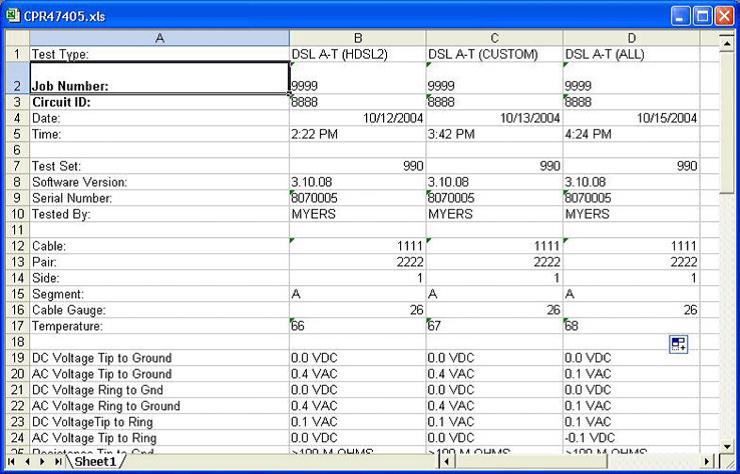
Sample CopperPro Reporter Test Report
New Features/Changes
Some of the new features and changes for the CopperPro Reporter Version 2 are:
- New graphical interface.
- Can run on Windows XP/7/8.
- New Thresholds Manager feature.
- The SAT format is not supported anymore. All reports are now saved as an Excel Spreadsheet.
- Report Limit: maximum number of cable pairs tested, saved, and reported at one time is in excess of 400 pairs.
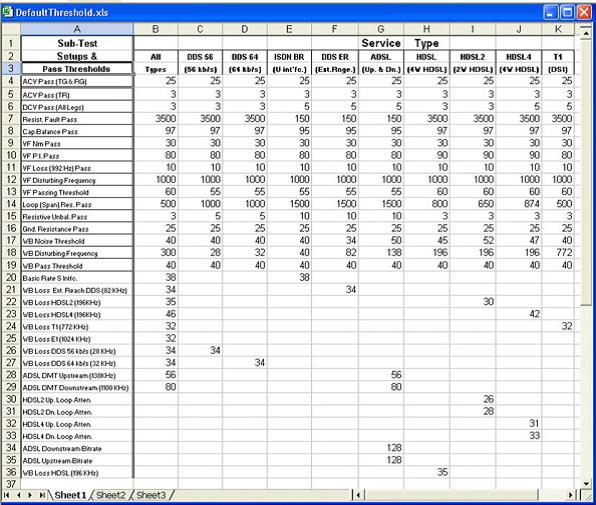
Manage and Customize test limits using Excel
Download
To download a copy of the new CopperPro Reporter Version 2 go to our support website or use the following link:
</support/downloads/52556/990DSL%2BCopperPro%25E2%2584%25A2%2BSeries%2BII%2BBroadband%2BLoop%2BTester>
Training
A new video training session on how to install and use the new CopperPro Reporter Version 2 can be found at: