
Each Versiv mainframe unit can store up to 100 projects. Subprojects configured in LinkWare Live count equally as projects towards that 100 project limit.
Where can I find information about a project on Versiv?
From the HOME screen, Tap on the Project Name, then Tap MANAGE -This will show
- Project completion percentage
- Exported (results) percentage
- Number of test setups
- Number of cable ID sets
- Number of passing and failing results.
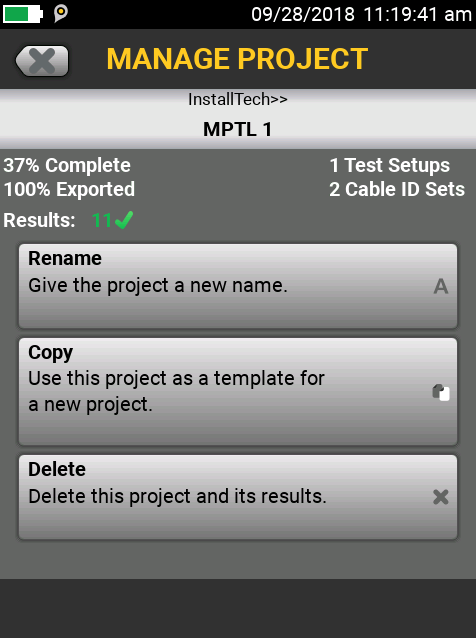
The three buttons allow you to Rename the project, Copy the project as a template for a new project, or Delete a project and its results.
Notes:
This delete method allows for deleting only one project at a time.
Make sure you export any results to LinkWare Live, USB flash drive, or LinkWare PC prior to deleting a project
Tapping Delete will bring up a dialog box to confirm the delete operation.
You may also Set up Projects in LinkWare Live and SYNC them to your Versiv tester.
How do I delete all Projects, test setups, and results from my tester?
Please...Make sure you back up your data before you to this! You have been warned.
Resetting the DSX-5000, CertiFiber Pro & OptiFiber Pro to factory default