
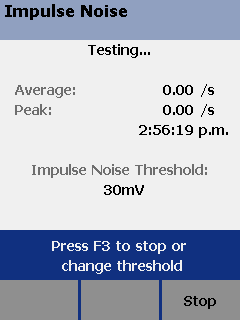
The test takes noise voltage samples every second on pair 3,6. The user can change the threshold from 10 mV to 500 mV.
Notes To extend battery life, connect the ac adapter when monitoring impulse noise for extended periods. The testers power down timer is disabled during the impulse noise test.
Monitoring impulse noise without a smart remote may produce unreliable test results.
To monitor impulse noise:
-
Attach twisted pair link interface adapters to the tester and smart remote.
-
Turn the rotary dial to MONITOR and turn on the smart remote; then connect to the testers to the ends of the cabling.
-
Press
 .
. -
To adjust the noise threshold, press
 to Stop; then use the
  and
and  keys to change the value. Press to resume testing.
Tip: Fluke Networks recommends a noise threshold of 30 mV with an average pulse rate below 0.01/sec for testing 1000BASE-T (Gigabit Ethernet) cabling.
To stop the test at any time, press  .
.
Note If you disconnect the tester and smart remote during the impulse noise test, it takes several minutes for the remote to stop testing.