
Users of LinkWare 6.2 asked whether we could do something about the software becoming sluggish when you have a file with over 10,000 test records in it. If you are looking to separate them so you can e-mail them, there are free sites such as that allow you to transfer large files.
In LinkWare 7.0 we introduced a new feature that allowing you to edit large files with ease.
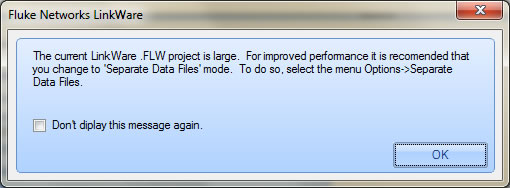
Get to 10,000 test records in a LinkWare file and you will be presented with the following screen:
Click OK followed by Options > Separate Data Files as shown below
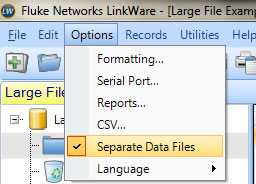
This will divide your LinkWare file into manageable sizes after you save the LinkWare file.

IMPORTANT
You can return the test records back into one LinkWare file by clicking on Options > Separate Data File and then saving the LinkWare file.