
WARNING: Only do this if instructed by the Fluke Networks Technical Assistance CenterThis will reduce the amount of test results you can save to the internal memory and increase the size of your LinkWare PC files. It offers no additional data/benefits in LinkWare PC for the user. What it does is store additional information from your OptiFiber Pro so that engineers at Fluke Networks can better analyze your results.
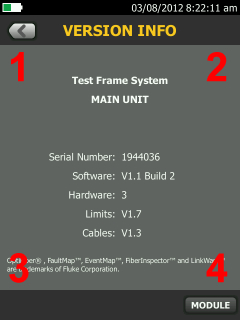
Tap Tools then Version Information. Tap the areas of the screen in the order indicated below:
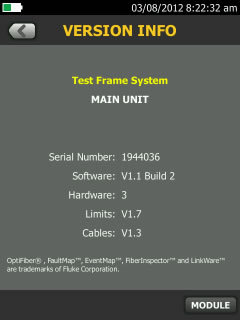
 You will then see Test Frame System text turn yellow.
 Once you have completed taking your data for the Technical Assistance Center, power off the OptiFiber Pro.That will restore the OptiFiber Pro to its normal state.