LinkIQ™ Cable+Wi-Fi+Network Tester
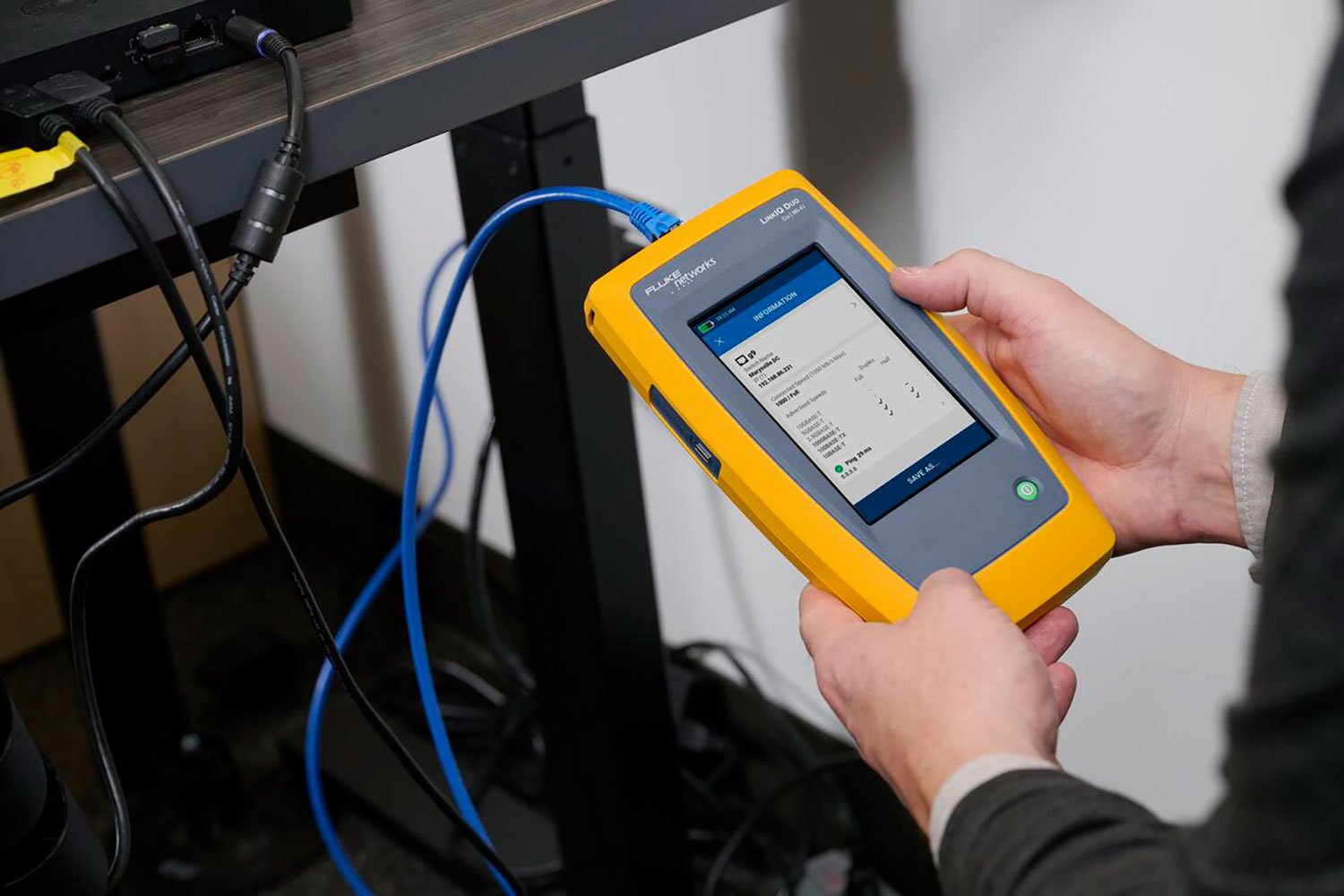
Product Highlights
Cable testing you trust. Network testing you need. Wi-Fi 6E ready.
- Cable performance testing up to 10GBASE-T plus troubleshooting (distance to fault, wire map, toning)
- Test and troubleshoot EtherNet/IP, PROFINET, EtherCAT cabling with M12X, M12D, and M8D adapters (IE versions)
- Network features include IPv4 and v6 ping, nearest switch diagnostics (IP address, name, port / VLAN number, and advertised data rates)
- Ethernet Alliance-certified PoE Verification detects the PoE class (1-8) and power, and performs a load test of available PoE from the connected switch
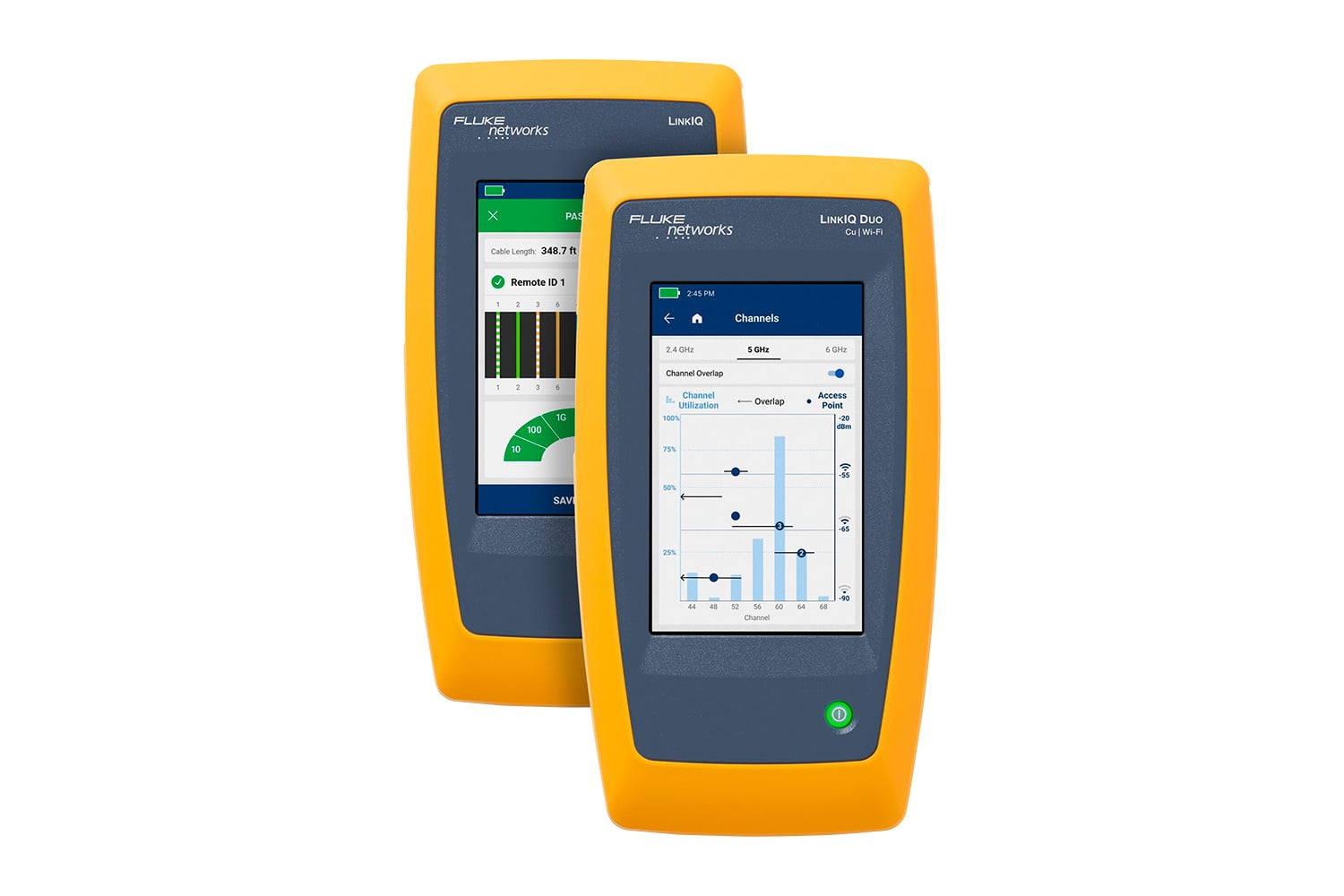
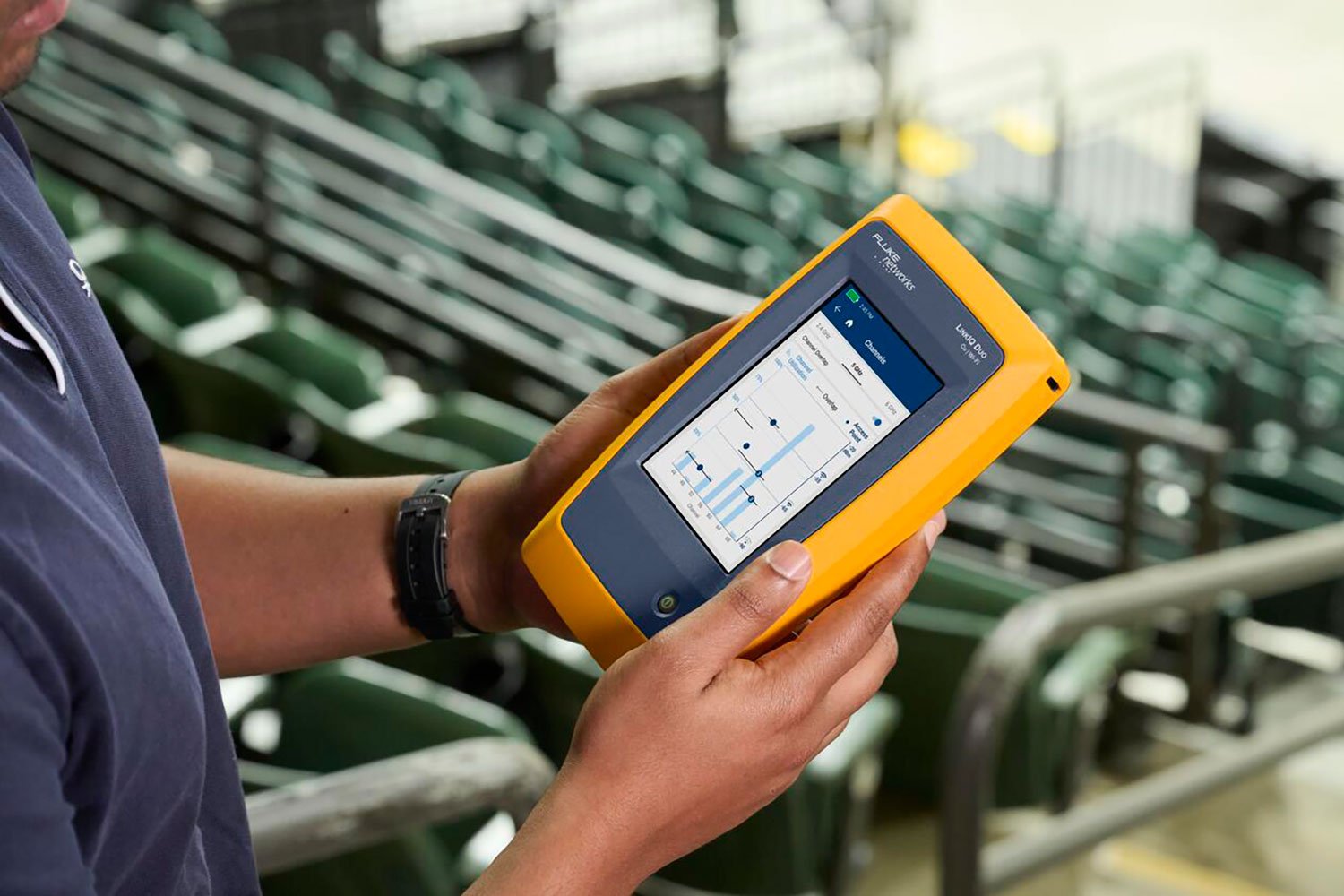
- Wi-Fi analysis to Wi-Fi 6E, including networks, channels, and access points (Duo model - 6 GHz support only in countries where allowed) View More >
- Manage results and print reports from LinkWare™ PC
Overview
The LinkIQ™ Cable+Wi-Fi+Network Tester is the testing solution to verify cable performance up to 10 Gb/s and solve network connectivity problems. The LinkIQ tester validates cable performance using frequency-based measurements and a wire map of the cable under test. It also performs ping tests to verify connectivity and nearest switch diagnostics to identify key network issues and validate switch configuration - eliminating the need for another device. The LinkIQ Duo model adds Wi-Fi analysis to Wi-Fi 6E (where approved), including networks, channels, and access points plus warning of common configuration issues. The IE models allow identification of miswired and split pairs on RJ45, M12X, M12D, and M8D terminated cables supporting EtherNet/IP, PROFINET, EtherCAT and other Industrial Ethernet protocols. Additional features include Analog and Digital Toning, Port Blink, Remote Office Locators, and the ability to manage results via LinkWare™ PC.
| Feature | LinkIQ Duo | LinkIQ | LinkIQ Duo IE | LinkIQ-IE |
|---|---|---|---|---|
| Wiremap | X | X | X | X |
| Length | X | X | X | X |
| Performance | to 10 Gb/s | to 10 Gb/s | to 10 Gb/s | to 10 Gb/s |
| Switch Info | Speed, Name, Address, VLAN, Port | Speed, Name, Address, VLAN, Port | Speed, Name, Address, VLAN, Port | Speed, Name, Address, VLAN, Port |
| Network Connectivity | X | X | X | X |
| Ethernet Alliance Certified PoE | Measure, Test all 802.3 af/at/bt | Measure, Test all 802.3 af/at/bt | Measure, Test all 802.3 af/at/bt | Measure, Test all 802.3 af/at/bt |
| Supported Wi-Fi Bands | 2.4 GHz, 5 GHz, 6 GHz | 2.4 GHz, 5 GHz, 6 GHz | ||
| Wi-Fi Tests | Networks, Channels, Access Points | Networks, Channels, Access Points | ||
| Industrial Connectors | M8D, M12D, M12X | M8D, M12D, M12X | ||
| Reporting App | LinkWare™ PC | LinkWare PC | LinkWare PC | LinkWare PC |
Features
Cable Testing You Trust
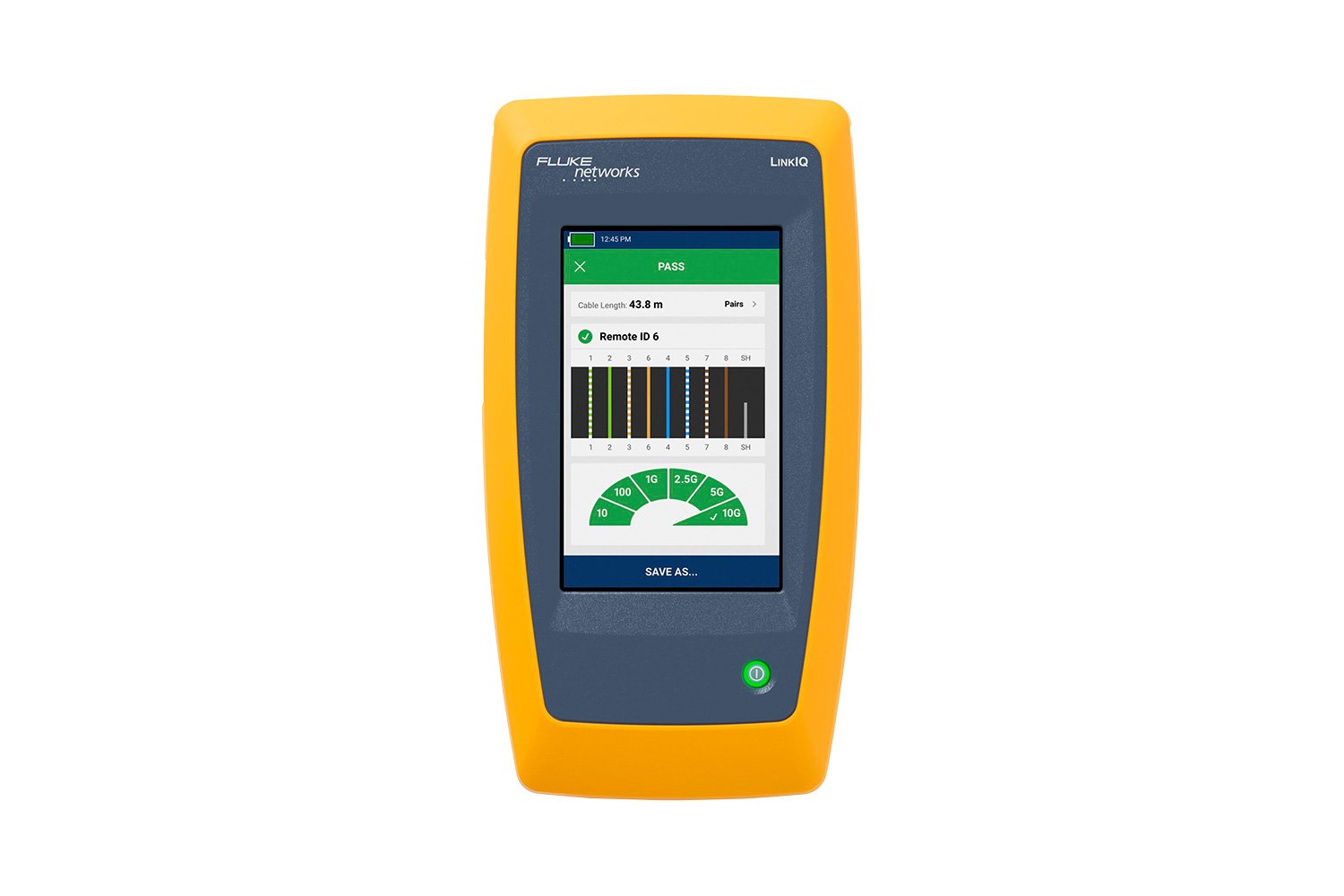
The LinkIQ tester is capable of measuring lengths up to 305 meters (1000 feet) and provides distance to faults such as opens, shorts, and unterminated cable. Using the remote ID allows for a complete wire map of the cable pairs which helps identify miswired and split pairs. The primary cable testing feature of LinkIQ tester is the cable performance test which qualifies the cabling bandwidth from 10BASE-T to 10GBASE-T (10 Mb/s up to 10 Gb/s). It performs these tests via frequency-based measurements. Using IEEE-standards-based measurements ensures that tested links meet performance requirements as opposed to transmission testers which only prove that the specific test devices can communicate over the link.
Operators may set performance requirements from 10 Mb/s to 10 Gb/s for a simple pass/fail indication.
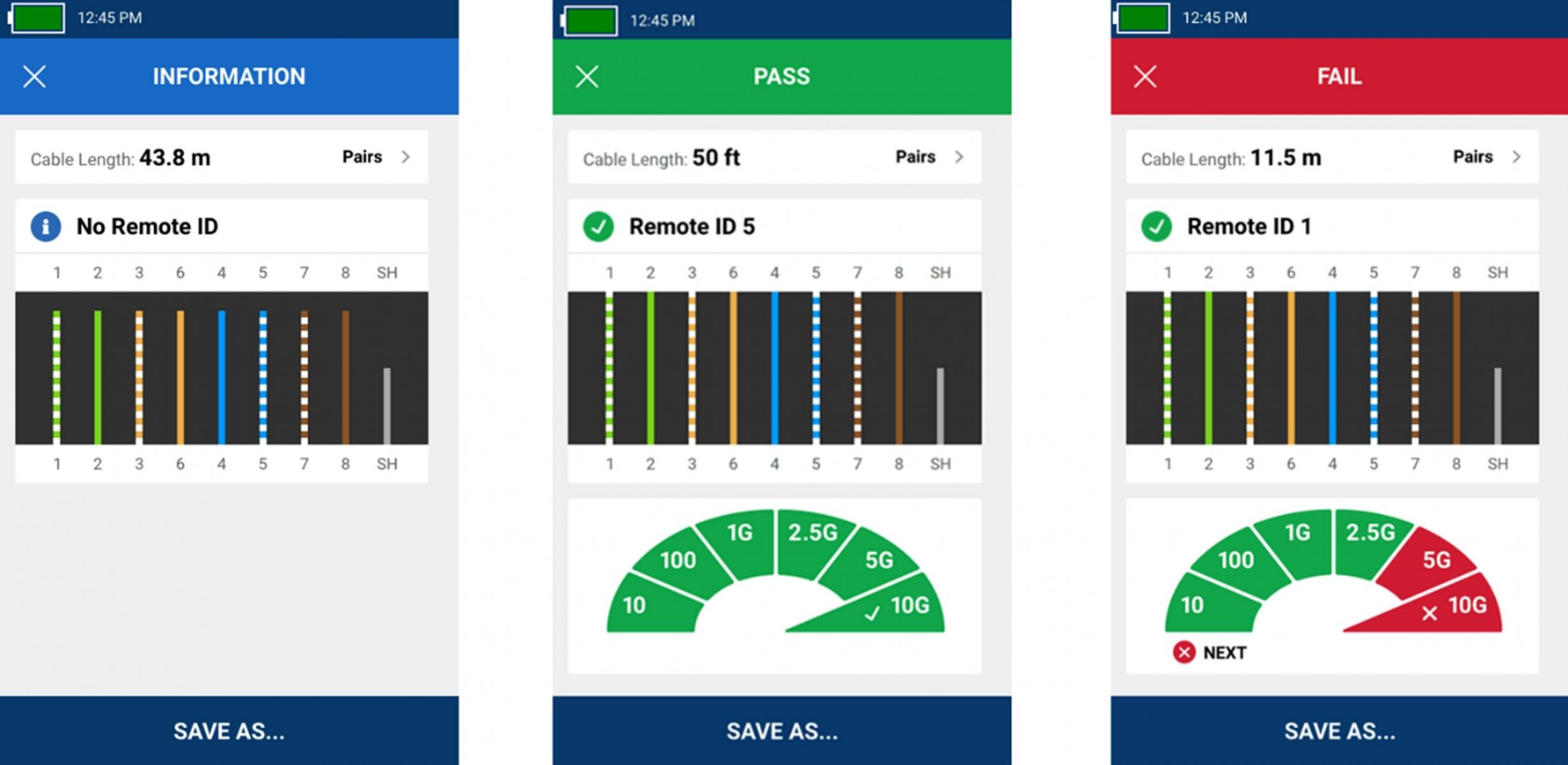
Left: Cable test without remote attached shows length and pairing of each wire. Center: Cable test with remote attached shows remote ID number 5, length and pairing of each wire, and cable performance of up to 10 Gb/s. Right: Cable test with remote attached shows remote ID number 1, length and pairing of each wire and cable performance of up to 2.5 Gb/s but failed the test due to a user-set limit of 10 Gb/s performance.
Network Testing You Need
Along with the robust cable testing features, the LinkIQ tester also provides detailed information on the nearest connected switch and connectivity testing with IP ping. The LinkIQ tester negotiates with the switch to identify the advertised data rate (up to 10GBASE-T), half/full duplex identification, the switch name and IP address, port number, and VLAN info.
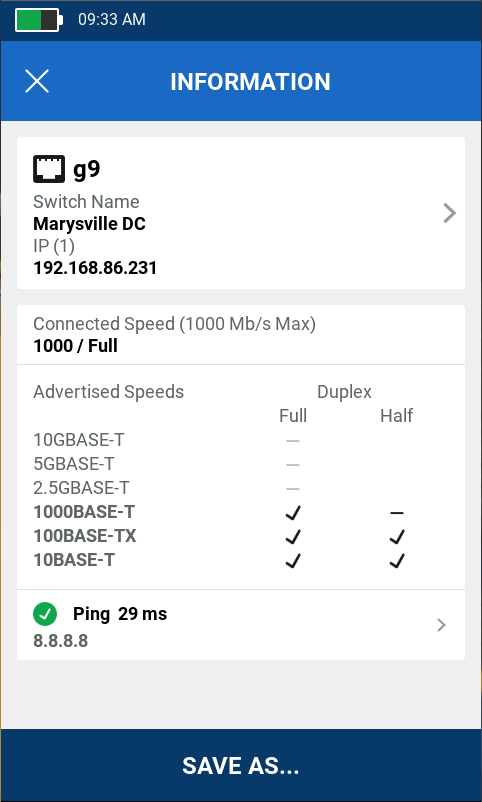
Switch port test shows switch name and IP address, connected port, and VLAN (separate screen) along with advertised speed and duplex settings. If a ping test is configured, the target address and average response time are shown. Scroll down to show Power over Ethernet results.
The ping test verifies connectivity to devices on the local network or the internet and supports both IPv4 and v6. The address of the LinkIQ tester may be set up manually or through DHCP. Once set, the ping test runs as part of the Autotest when a switch is detected. Results of the ping test include identification and response time of each of four pings to the target, the DNS server, and gateway.
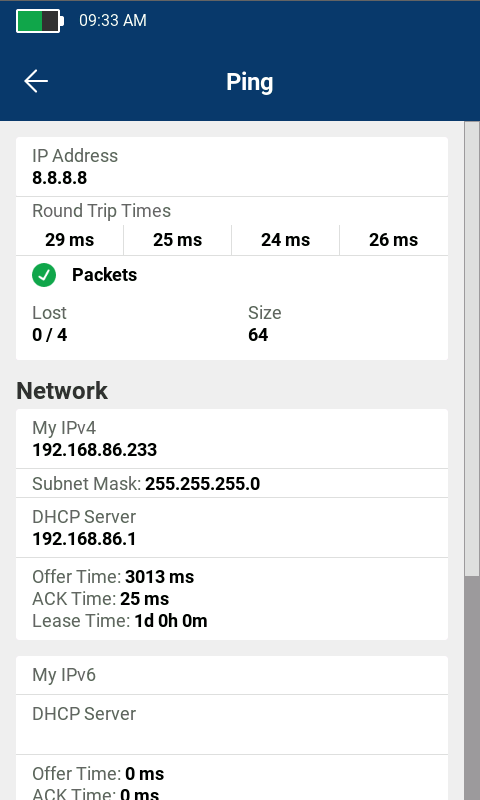
Ping result screen shows response time to target for each of four pings. Scroll down to display DHCP, DNS, and gateway information.
In-Depth PoE Testing
While Power over Ethernet makes installation of devices such as security cameras and access points simpler, a survey by the Ethernet Alliance of over 800 installers, integrators, and end users found that four of five respondents experienced difficulties in integrating PoE systems. Part of this can be traced to the fact that the IEEE offers three PoE standards, the term PoE is not registered, and there are a variety of non-standards-compliant implementations.
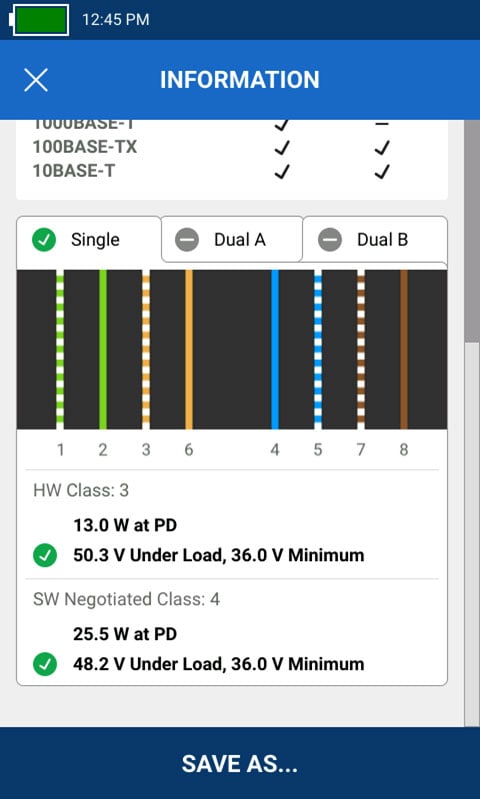
Switch port Power over Ethernet settings shows pairs used, power and class available and results of the PoE test under load.
To simplify PoE installation and troubleshooting, the LinkIQ tester shows the pairs where power is provided, including the different power levels and pairs for dual-signature implementations. Further, the LinkIQ tester will actually place a load on the connection to ensure that the advertised power is actually being delivered by the switch across the cabling infrastructure. The LinkIQ tester has been certified by the Ethernet Alliance to IEEE-802.3™ standards for reliable multivendor interoperability.
LinkWare™ PC Documentation
The LinkIQ tester provides complete documentation abilities for the tests it performs. Up to 1,000 results can be given descriptive names and stored and recalled in the tester. Test names and numbers automatically increment as each is saved: Annex B-1, Annex B-2, Annex B-3, etc. which saves time when testing cables in sequence.
Report data may be exported to a PC for documentation purposes. The LinkIQ tester uses LinkWare™ PC, Fluke Networks’ reporting software which supports a variety of testers going back 20 years and is the industry’s leading reporting solution with tens of thousands of active users. LinkWare PC can be used to store the results as well as generate PDF reports.
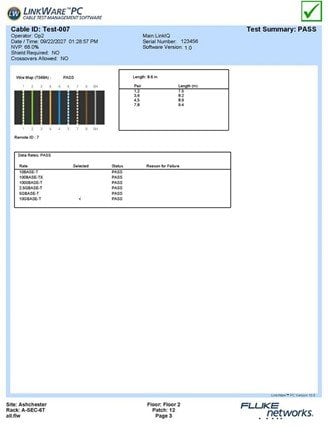
Use LinkWare PC to generate PDF test reports.
Modern Design and Interface
Like today’s smartphone, the LinkIQ is based on a gesture-based touchscreen that takes up nearly all the face of the instrument. This makes it easy to display a large amount of information and provide clear, simple controls such as sliders and a full keyboard. While the LinkIQ can perform a variety of tests, the user interface is simplified so that there is a single TEST function. The results displayed are determined solely by what is connected to the unit’s single “RJ-45” connector. A single USB-C port provides connectivity to a computer for future software updates, reporting, and charging the unit. Like other Fluke Networks products, the LinkIQ is designed and tested in our environmental lab to ensure its ruggedness including vibration, temperature, humidity, electrostatic discharge and drop tests.
Additional Features
- Language support for English, German, French, Japanese, Thai, Spanish, Traditional Chinese, Simplified Chinese, Korean, Russian, Italian, Portuguese, Czech, Danish, Dutch, Finnish, Norwegian, Polish, Swedish, and Turkish
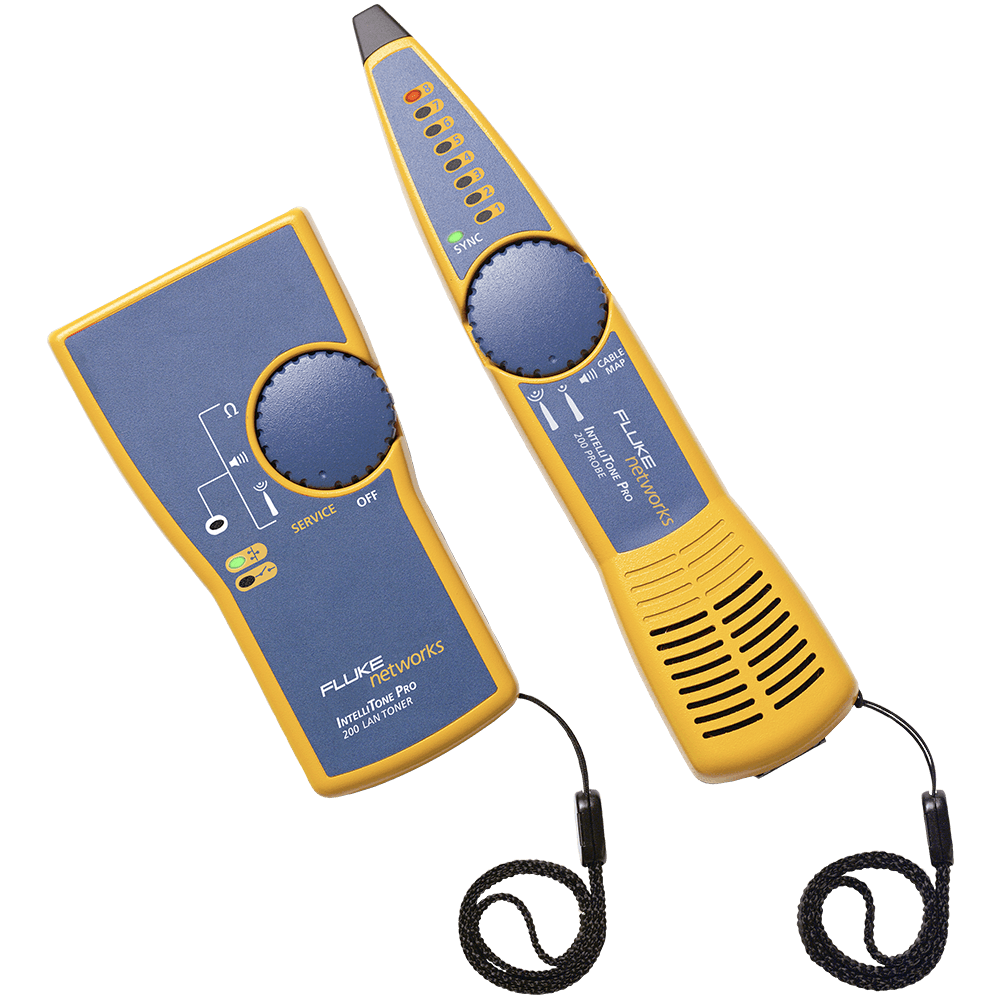
- Generates analog or digital tones compatible with the IntelliTone™ or Pro3000™ probe to assist in locating cables in a wall or telecommunications room
- Blink Port light on switch to help identify the connected switch port
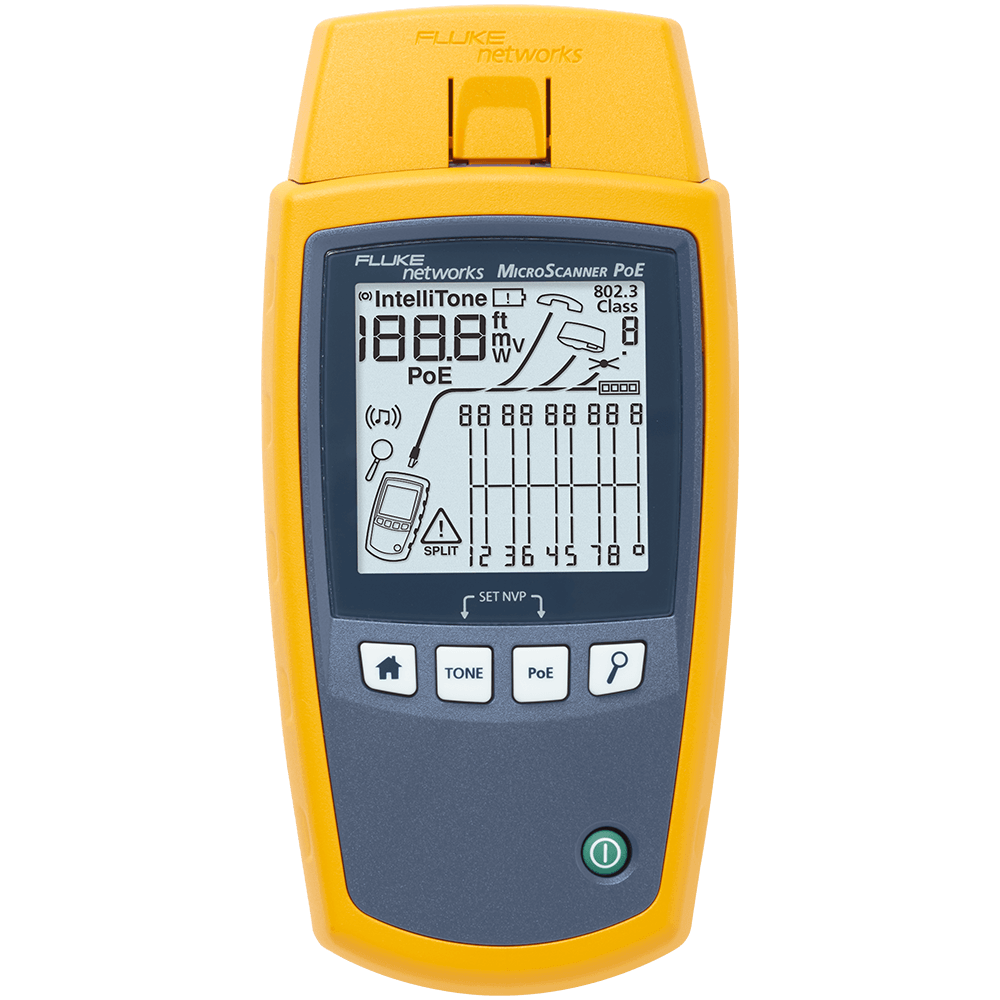
- Compatible with MicroScanner™ PoE Remote Identifiers for Ethernet outlet identification
- Touch Sensitive gesture-based display
- Rechargeable Li-Ion battery
- Easy Feature and Network Testing Upgrades via USB-C using LinkWare™ PC
- Charging via standard USB-C port
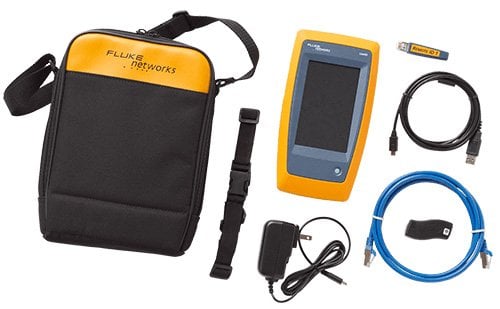
All LinkIQ models include mainframe and accessories.
Testing to Wi-Fi 6E (LinkIQ Duo)
The LinkIQ Duo tester makes it easy to understand the Wi-Fi environment by running a complete suite of tests and displaying the results the way you want to view them: by networks, channels, or access points. Choosing a specific item (such as an access point listed under a specific network) changes seamlessly to that view. The LinkIQ Duo tester also flags common configuration errors including:
- use of an illegal channel for the detected region
- use of a non-recommended channel
- access points that overlap with an adjacent access point unless one is low power
- weak security settings
The Networks test displays a list of available networks (SSIDs) by name along with encryption, technology supported, and the number of access points in range supporting each network. Tap a network to view a detailed list of all radios in range that support the network including BSSID and band/channel. The LinkIQ Duo tester can test a specific network / access point combination by tracking signal strength and data rates over time. Details about a specific access point can be accessed from here as well.
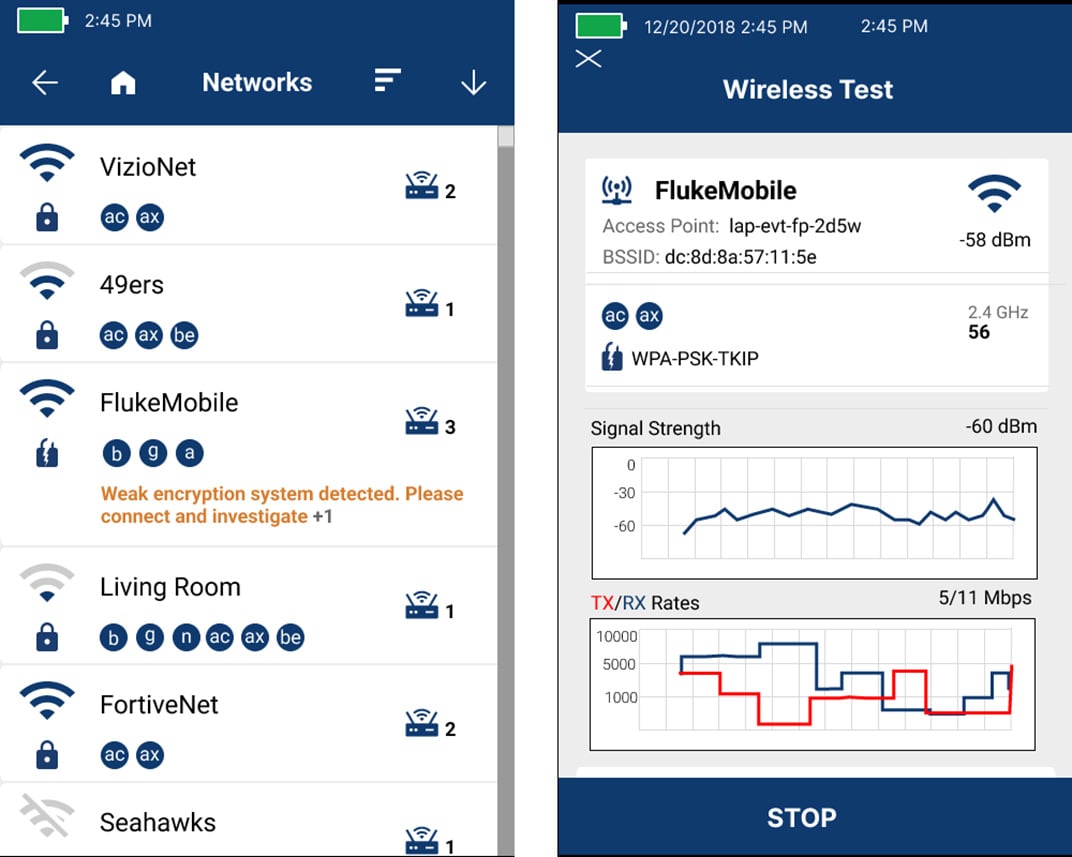
Left: Network detail showing nearest AP, signal strength, radios, band/channel summary, technology, and encryption. Right: Access point test shows signal strength and data rates over time.
The Access Point test displays a list of available access points by name or BSSID, with a summary of channels/bands and networks supported along with encryption types. Touching an access point allows tracking of signal strength and channel utilization for each radio in the AP.
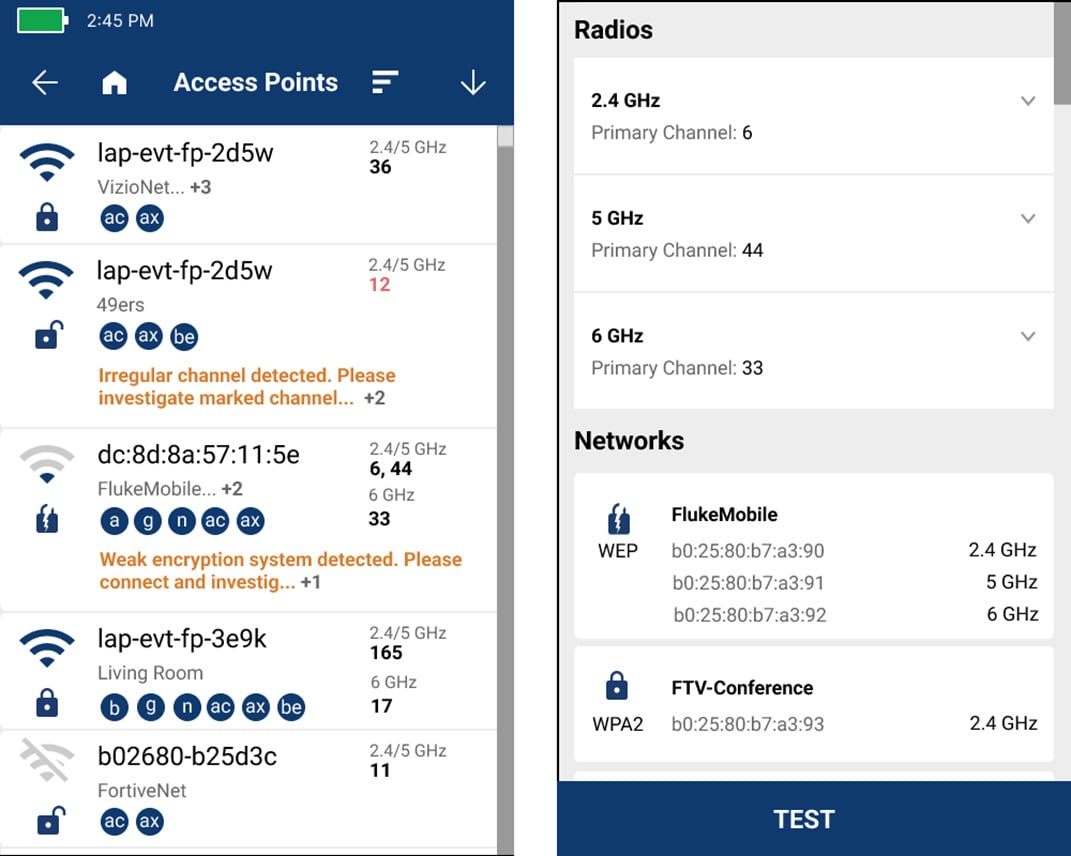
Left: List of access points, that show the name or BSSID, supported networks (SSID) band/channel, and encryption type. Right: AP detail shows radio bands/channels and supported networks.
For the channel test, select a band (2.4 GHz, 5 GHz, or 6 GHz) and see the utilization, AP signal strength and number of APs on each channel. Select the unique Channel Overlap view to see how many and which AP’s are on or interfering with a given channel as well as their signal strength. Touch a channel to see utilization over time and which APs are on or interfering with that channel.
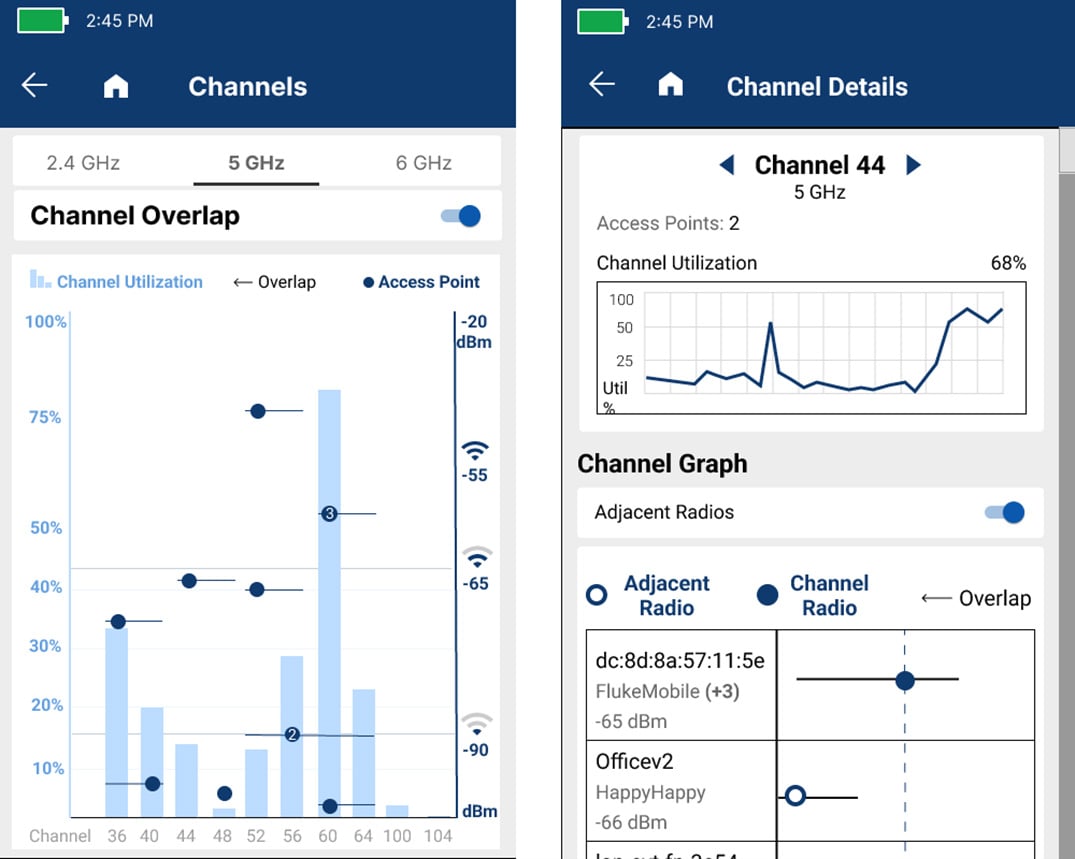
Left: Utilization of each channel on the 5 GHz bandwidth showing AP’s and overlap for each. Right: Details of an individual channel show the utilization over time and details of radios on that overlap with that channel.
Solve the #1 Cause of Industrial Ethernet Failures
Research shows that the most common causes of Industrial Ethernet failures are cable related. The LinkIQ-IE Industrial Ethernet Remote Adapter allows for a complete wire map of the cable pairs to identify miswired and split pairs on RJ45, M12X, M12D, and M8D terminated cables. Distance to opens and shorts are shown, and remote identifiers can be used to determine which cable goes where. The LinkIQ tester supports EtherNet/IP, PROFINET, EtherCAT, and other Industrial Ethernet cables and qualifies the bandwidth from 10BASE-T to 10GBASE-T (10 Mb/s up to 10 Gb/s).
Fluke Premium Care (Gold)
When you invest in the best equipment, you want your money to go as far as possible. Add Fluke Premium Care to provide coverage above and beyond your tool’s original product warranty, so you don’t need to worry about unexpected downtime caused by damaged test equipment, accessories, or tools in need of calibration or repair.
| Standard Warranty | Premium Care Standard | |
|---|---|---|
| Repair manufacturing defects | • | • |
| Accidental damage and repair | • | |
| Replacement of damaged accessories | • | |
| Annual calibration or performance check | • | |
| Expedited calibration and repair | • | |
| Priority technical support | • | |
| Expedited shipping | • |
Learn more about Fluke Premium care at www.fluke.com/premiumcare.
LinkIQ™ Cable+Wi-Fi+Network Tester Features
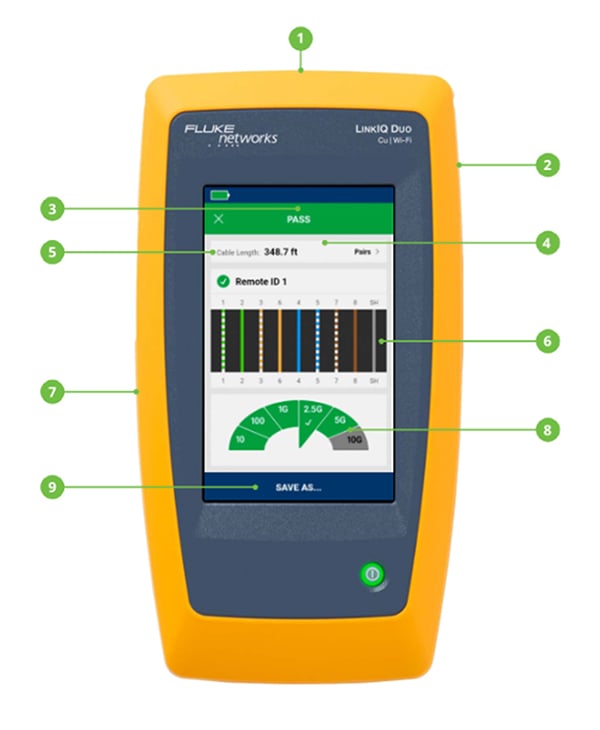
- RJ45 Port for connection to cable or switch port
- Internal antenna for Wi-Fi radio supporting 2.4 GHz, 5 GHz, and 6 GHz bands (LinkIQ Duo model only)
- PASS/FAIL frequency-based measurement results
- Touch Screen Color Display
- Length measurement shows distance to termination, open, or short
- Wire map shows type and location of fault (miswires, split pairs, shorts, breaks)
- USB-C port for data export, software updates and charging
- Cable performance to 10 Gb/s shown in speedometer format
- Save up to 1000 test results on the unit and export to LinkWare™ PC
Models & Accessories
Models
LIQ-100 GOLD
LIQ-100 Gold Support
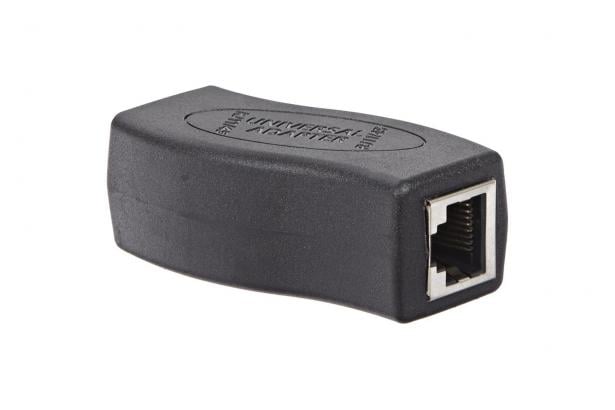
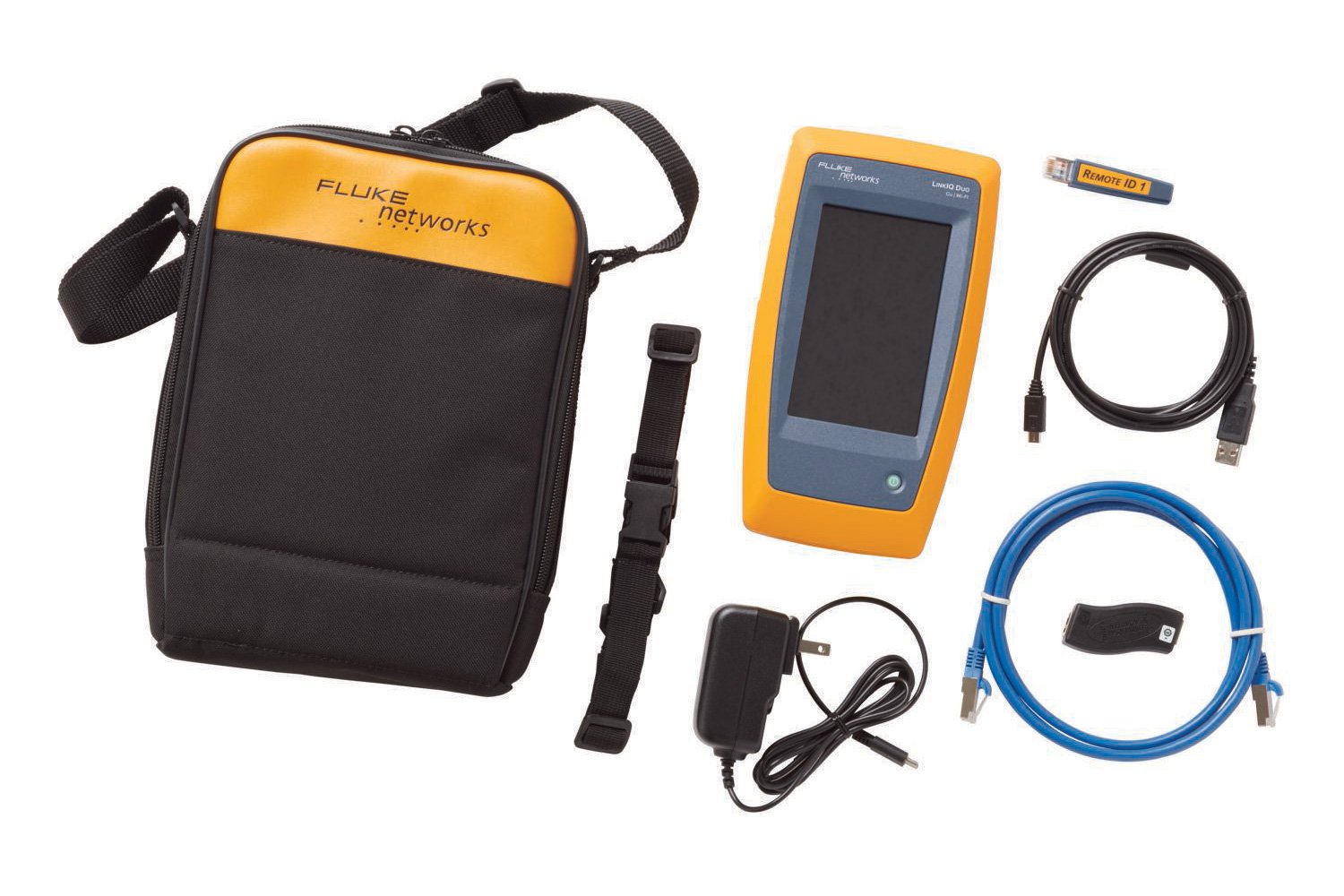
LinkIQ Cable+Network tester includes LinkIQ with remote ID #1, RJ45-RJ45 patch cord, AC charger, RJ45/11 universal coupler, and carrying case. See Photo
Learn more about Fluke Premium Care – Gold
GLD-LIQ
1 Year of Gold Support for one LinkIQ mainframe
GLD3-LIQ
3 Years of Gold Support for one LinkIQ mainframe
LIQ-KIT GOLD
LIQ-KIT Gold Support
LinkIQ Cable+Network tester includes LinkIQ with remote IDs #1-7, RJ45-RJ45 patch cord, AC charger, RJ45/11 universal coupler, Intellitone Pro 200 probe and duffle bag carrying case. See Photo
Learn more about Fluke Premium Care – Gold
GLD-LIQ
1 Year of Gold Support for one LinkIQ mainframe
GLD3-LIQ
3 Years of Gold Support for one LinkIQ mainframe
LIQ-100-IE GOLD
LIQ-100-IE Gold Support
LinkIQ™ Cable + Network Tester with Multi-Connector Adapter with magnetic strap, RJ45 Remote-ID #1, Quick Reference Guide, USB-C to USB-A cable, Charging cable, Cat6A patch cord, RJ45 male to RJ45 female patch cord, RJ45/M12X patch cord, RJ45/M12D patch cord, RJ45/M8D patch cord, RJ45/11 Modular Adapter, Hanging strap with Remote ID holder, and duffle bag. See Photo
Learn more about Fluke Premium Care – Gold
GLD-LIQ-IE
1 Year Gold Support for LinkIQ™ Cable + Network Tester and Industrial Ethernet Remote Adapter
GLD3-LIQ-IE
3 Year Gold Support for LinkIQ™ Cable + Network Tester and Industrial Ethernet Remote Adapter
LIQ-KIT-IE GOLD
LIQ-KIT-IE Gold Support
LinkIQ™ Cable + Network Tester with Multi-Connector Adapter with magnetic strap, RJ45 Remote-IDs #1-7, Quick Reference Guide, USB-C to USB-A cable, Charging cable, Cat6A patch cord, RJ45 male to RJ45 female patch cord, RJ45/M12X patch cord, RJ45/M12D patch cord, RJ45/M8D patch cord, RJ45/11 Modular Adapter, Hanging strap with Remote ID holder, IntelliTone Pro 200 Probe, and duffle bag. See Photo
Learn more about Fluke Premium Care – Gold
GLD-LIQ-IE
1 Year Gold Support for LinkIQ™ Cable + Network Tester and Industrial Ethernet Remote Adapter
GLD3-LIQ-IE
3 Year Gold Support for LinkIQ™ Cable + Network Tester and Industrial Ethernet Remote Adapter
LIQ-KIT-FTK1475
LIQ-KIT-FTK1475
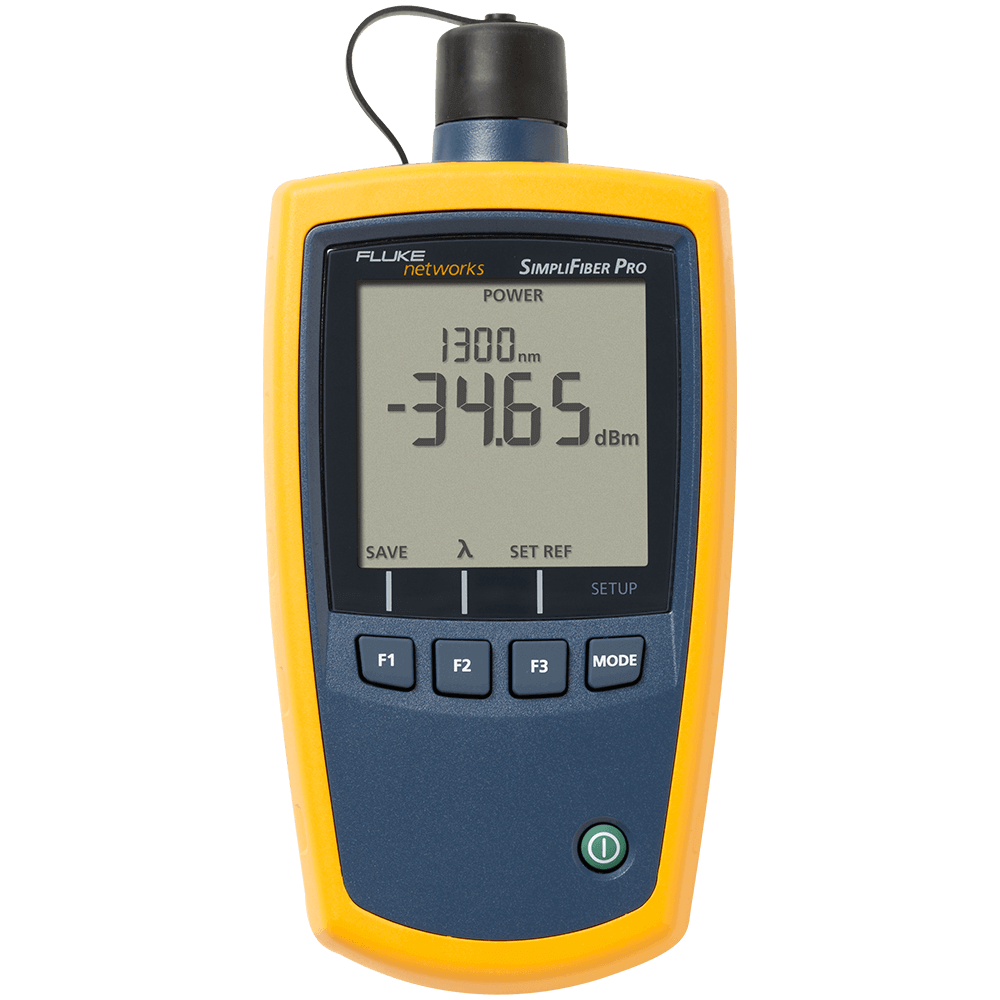
Network Troubleshooting Professional Kit includes LinkIQ Cable+Network tester includes LinkIQ with remote IDs #1-7, RJ45-RJ45 patch cord, AC charger, RJ45/11 universal coupler, Intellitone Pro 200 probe and duffle bag carrying case; SimpliFiber Pro optical power meter, 850/1300 multimode source, 1310/1550 singlemode source. See Photo
Learn more about Fluke Premium Care – Gold
LIQ-KIT-FQM-100MIC
LIQ-KIT-FQM-100MIC
Network Troubleshooting Qualification Kit includes LinkIQ Cable+Network tester includes LinkIQ with remote IDs #1-7, RJ45-RJ45 patch cord, AC charger, RJ45/11 universal coupler, Intellitone Pro 200 probe and duffle bag carrying case; Fiber QuickMap™; FI-500 Micro Inspection Camera. See Photo
Learn more about Fluke Premium Care – Gold
LIQ-KIT-VFL-FBRLRT
LIQ-KIT-VFL-FBRLRT
Essential Copper Fiber Troubleshooting Kit includes LinkIQ Cable+Network tester includes LinkIQ with remote IDs #1-7, RJ45-RJ45 patch cord, AC charger, RJ45/11 universal coupler, Intellitone Pro 200 probe and duffle bag carrying case; VisiFault VFL; FiberLert. See Photo
Learn more about Fluke Premium Care – Gold
LIQ-KIT-MS2-100
LIQ-KIT-MS2-100
Twisted Pair and Coax Network Kit includes LinkIQ Cable+Network tester includes LinkIQ with remote IDs #1-7, RJ45-RJ45 patch cord, AC charger, RJ45/11 universal coupler, Intellitone Pro 200 probe and duffle bag carrying case; MicroScanner2. See Photo
Learn more about Fluke Premium Care – Gold
LIQ-KIT-IS60
LIQ-KIT-IS60
LinkIQ Technician Kit includes LinkIQ Cable+Network tester includes LinkIQ with remote IDs #1-7, RJ45-RJ45 patch cord, AC charger, RJ45/11 universal coupler, Intellitone Pro 200 probe and duffle bag carrying case; IS60 Pro-Tool Kit. See Photo
Learn more about Fluke Premium Care – Gold
LIQ-KIT-87-5 (US Only) GOLD
LIQ-KIT-87-5 (US Only) Gold Support
Electrical & Network Troubleshooter Kit includes LinkIQ Cable+Network tester includes LinkIQ with remote IDs #1-7, RJ45-RJ45 patch cord, AC charger, RJ45/11 universal coupler; IntelliTone Pro 200 probe and duffle bag carrying case; Fluke 87V Industrial Multimeters with TL75 Test Leads (TL175 Eur), AC175 alligator clips, holster with tilt-leg/test lead storage, 80BK temperature probe, 9V battery (installed), C3004IND duffle case. See Photo
Learn more about Fluke Premium Care – Gold
GLD-LIQ
1 Year of Gold Support for one LinkIQ mainframe
GLD3-LIQ
3 Years of Gold Support for one LinkIQ mainframe
LIQ-KIT-3 PACK
LIQ-KIT-3 PACK
LIQ-KIT-6 PACK
LIQ-KIT-6 PACK
LIQ-100/FPC3 GOLD
LIQ-100/FPC3 Gold Support
LIQ-KIT/FPC3 GOLD
LIQ-KIT/FPC3 Gold Support
LIQ-100-IE/FPC3 GOLD
LIQ-100-IE/FPC3 Gold Support
LIQ-KIT-IE/FPC3 GOLD
LIQ-KIT-IE/FPC3 Gold Support
FPC1S-LIQ-1 GOLD
FPC1S-LIQ-1 Gold Support
FPC3S-LIQ-1 GOLD
FPC3S-LIQ-1 Gold Support
LIQ-DUO
LIQ-DUO
LIQ-DUO/FPC3 GOLD
LIQ-DUO/FPC3 Gold Support
LIQ-DUO-KIT
LIQ-DUO-KIT
LIQ-DUO-KIT/FPC3 GOLD
LIQ-DUO-KIT/FPC3 Gold Support
LIQ-DUO-IE
LIQ-DUO-IE
LIQ-DUO-IE-KIT
LIQ-DUO-IE-KIT
LIQ-DUO-KIT-3PK
LIQ-DUO-KIT-3PK
LIQ-DUO-KIT-6PK
LIQ-DUO-KIT-6PK
LIQ-DUO-KIT-1475
LIQ-DUO-KIT-1475
LIQ-DUO-VFL-LFD
LIQ-DUO-VFL-LFD
Accessories
CIQ-RJA
CIQ-RJA
REMOTEID-1
REMOTEID-1
REMOTEID-KIT
REMOTEID-KIT
MS-IE-ADAPTER SET
MS-IE-ADAPTER SET
LIQ-BATTERY
LIQ-BATTERY
Specifications
General Specifications
| Feature | Description |
| Languages supported in UI | English, German, French, Japanese, Spanish, Thai, Traditional Chinese, Simplified Chinese, Korean, Russian, Italian, Portuguese |
| Weight | 1 lbs 6 oz (624g) |
| Battery | Type: Lithium-ion, 3.6 V, 6400 mAh |
| Power Adapter | Input: 100 to 240 VAC ±10%, 50/60Hz Output: 15 VDC, 2 A maximum Class II |
| Host Interface | USB type C |
| Display | 800 x 480 color capacitive multi-touch |
| Dimensions | 8.5 in x 4.5 in x 1.875 in |
| Operating Temperature | 0°C to 45°C |
| Storage Temperature | -10°C to +60°C |
| Operating Relative Humidity | 0 % to 90 %, 0°C to 35°C 0 % to 70 %, 35°C to 45°C |
| Operating Altitude | 4,000 m 3,200 m with ac adapter |
| Vibration | Random, 2 g, 5 Hz-500 Hz |
| Drop | 1 m drop, 6 sides |
Active Network Diagnostics
| Diagnostic Protocols | Link Layer Discovery Protocol (LLDP) Cisco Discovery Protocol (CDP) Fast Link Pulses (FLP) Internet Control Messaging Protocol (ICMP) Dynamic Host Configuration Protocol (DHCP) |
| IP Address Setup | LinkIQ address, DNS Server, Gateway for IPv4 or v6 either manually or via DHCP. |
| IP Ping Test Results | Four response time results for target, DNS Server(s), Gateway, plus average and number lost |
| Nearest Device Diagnostics (If available through diagnostic protocols) | Switch Name / IP + MAC Address Port Number VLAN Name Advertised Data Rates Advertised Duplex |
| Power Over Ethernet Compatibility | Ethernet Alliance Certified to IEEE 802.3af/at/bt Hardware negotiation with signature resistance Software negotiation with LLDP/CDP |
| Power Over Ethernet Diagnostics | Advertised Power Class (0-8) Advertised Available Power Powered Pairs Diagnostics for both Single and Dual signatures |
| Power Over Ethernet Measurements | Loaded Voltage (V) Loaded Power (W) |
| Port Blink | Blink the light of the connected port |
Cable Test Specifications
| Test Port | Shielded 8-pin modular jack accepts 8-pin modular (RJ45) plugs. |
| Commissioning Autotests | 10GBASE-T, 5GBASE-T, 2.5GBASE-T, 1000BASE-T, 100BASE-TX, 10BASE-T, Wire map Only Test Speed: 6 seconds for lengths < 70 m |
| Cable Types | Balanced twisted-pair cabling Unshielded twisted-pair Screened twisted-pair 2-pair and/or 4-pair |
| Wire Map-Only Tests | Document wire map Length of each pair Diagnose split pairs User selectable T568A or T568B User selectable crossover settings (Straight through, Half-crossover, Full-crossover) Test speed: 1 second for lengths < 120 m |
| Length (Maximum) | 305 m (1000 ft) |
| Nominal Velocity of Propagation (NVP) | User settable |
| Tone Generator | Generates digital tones compatible with Fluke Networks IntelliTone probe. Generates analogy tones compatible with general analog probes. |
| Remote ID Locators | Use remote ID terminations to identify up to 7 unique ports or office outlets |
Wi-Fi Test Specifications (LIQ Duo Models Only)
| Supported Wireless Standards | 802.11b, 802.11a, 802.11g, 802.11n (Wi-Fi 4), 802.11ac (Wi-Fi 5), and 802.11ax (Wi-Fi 6/6E). Additionally, the tester will report the presence of future standards, such as 802.11be, if the standard's presence can be decoded in a supported beacon. |
| Frequencies Supported | Frequencies of channels received and transmitted (where allowed by country regulations): 2.4 GHz band: 2.402 to 2.482 GHz (channel 1 to channel 13); 5 GHz band: 5.170 to 5.330 GHz , 5.490 to 5.730 GHz , 5.735 to 5.835 GHz (channel 36 to channel 165); 6 GHz band: 5.945 to 7.125 GHz (channel 1 to channel 233). NOTE: The tester transmits only on the frequencies allowed in the country where it is sold. |
| Country certifications | AE, AU, AR, BR, CA, CL, CN, IN, JP, KR, KW, MY, MX, NZ, PH, SG, TH, TW, UK, US, ZA, plus the European Union (Completed or in process. Contact your local Fluke representative for details.) |
| Network Tests | Number and name (BSSID) of available access points, signal strength, security type, IEEE 802.11 standard supported |
| Access Point Tests | Networks supported / country code, BSSID, signal strength, band/channel/bandwidth, IEEE 802.11 standards supported, security types, TX/RX rates |
| Channel Tests | Utilization, Number / signal strength of access points, overlap |
Documents
Manuals
- LinkIQ™/LinkIQ™ Duo Cable+Network Tester Translated Manuals For translated manuals, click here
- MicroScanner Adapter Set Quick Reference Guide
- LinkIQ™ FIBER 1G LinkIQ™ FIBER 10G LinkIQ™ Fiber Kit Reference Guide
- LinkIQ™/LinkIQ™ Duo Cable+Network Tester Quick Reference Guide
- LinkIQ™/LinkIQ™ Duo Cable+Network Tester Safety Information
- LinkIQ™/LinkIQ™ Duo Cable+Network Tester Users Manual
Data Sheets
White Papers
- Evolving Building and Industrial Fieldbus to a Unified Ethernet Infrastructure By Panduit and Fluke Networks
- Whitepaper: A Guide to Successful Installation of Power over Ethernet A guide to how PoE works, how to select compatible equipment, and what you need to be aware of and test for when installing or troubleshooting PoE.
Flyers
Catalogs
Brochure
数据表
应用文章
Handbücher
Datenblätter
Flyer
Kataloge
Manuales
Fichas técnicas
Notas de aplicación
Catálogos
Hoja Publicitaria
Manuels
Fiches techniques
Catalogues
Notes D’Application
マニュアル
データシート
アプリケーション・ノート
설명서
데이터 시트
Manuais
Planilha de dados
Notas de aplicação
Downloads
LinkIQ™ Cable+Network Tester Version 2.1 Software
Please install the latest version of LinkWare PC.
For managing, storing, and printing LinkIQ test results.