SimpliFiber® Pro Optical Power Meter and Fiber Test Kits
Product Highlights
Simple-to-use fiber-loss tester with advanced time-saving features. Choose from various kits with configurations to meet your fiber verification, inspection, and cleaning needs.
- Single-port, simultaneous dual-wavelength feature completes testing in half the time and saves measurements from both wavelengths into one record
- Additional wavelengths of 1490 and 1625 nm
- CheckActive™ feature emits an audible tone and displays an icon when a live fiber is detected, eliminating the need to set up a measurement
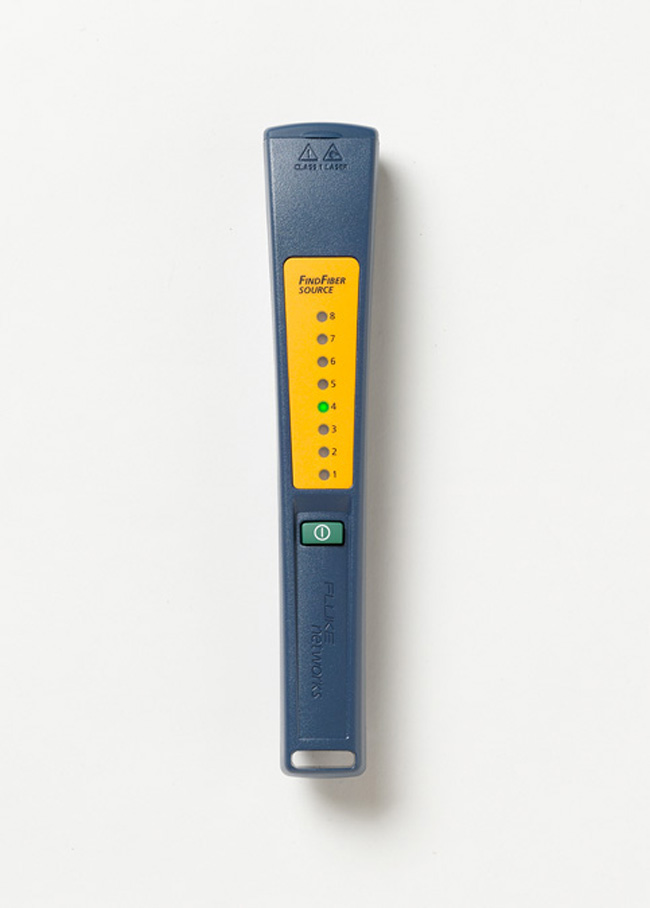
- FindFiber™ Remote ID enables one individual to quickly identify cable connections or routings (especially useful at patch panels), eliminating the need for multiple technicians on opposite ends of a fiber link to match color combinations
- Min/Max capability automates precision tracking of intermittent power fluctuations View More >
- Large internal memory save 1000 results which enables continuous testing and recording
- LinkWare Cable Test Management software helps to analyze test results and create professional test reports
- Various kit configurations for all “first line” fiber handling needs, including fiber verification, inspection, and cleaning – all housed in a professional, rugged carrying case
- Mag Kit Strap Attachment - Strong rare earth magnet attaches to metal surfaces in the testing environment, allowing the technician to work "hands free"
Overview
Today’s high-bandwidth premises networks depend on a reliable fiber optic infrastructure. Proper installation and maintenance of fiber cabling is imperative for minimizing network downtime. Whether you require basic fiber verification capabilities, advanced troubleshooting and inspection, or documented loss and power measurements, Fluke Networks’ SimpliFiber® Pro Optical Power Meter and Fiber Test Kits are the best first-line fiber instruments to meet your needs.
SimpliFiber® Pro Optical Power Meter and Fiber Test Kits include all the tools necessary to verify and troubleshoot optical fiber cabling systems, measure loss and power levels, and inspect and clean connector end-faces. Replacing the popular SimpliFiber series, these next generation optical loss test kits boast industry-leading functions such as dual-wavelength testing and automatic-wavelength detection, in addition to unique features such as CheckActive™, FindFiber™, and Min/Max. With such advanced, yet easy-to-use, capabilities that reduce test times, SimpliFiber Pro is simply the best first-line fiber test kit on the market.
Features
SimpliFiber Pro Kit Configurations
Whether you require basic fiber verification capabilities, advanced cable troubleshooting and inspection, or documented loss and power measurements, Fluke Networks’ SimpliFiber Pro® Optical Loss Test Kits provide you with the rugged, high quality tools that meet your fiber testing needs.
Complete Fiber Verification Kit (FTK1475)
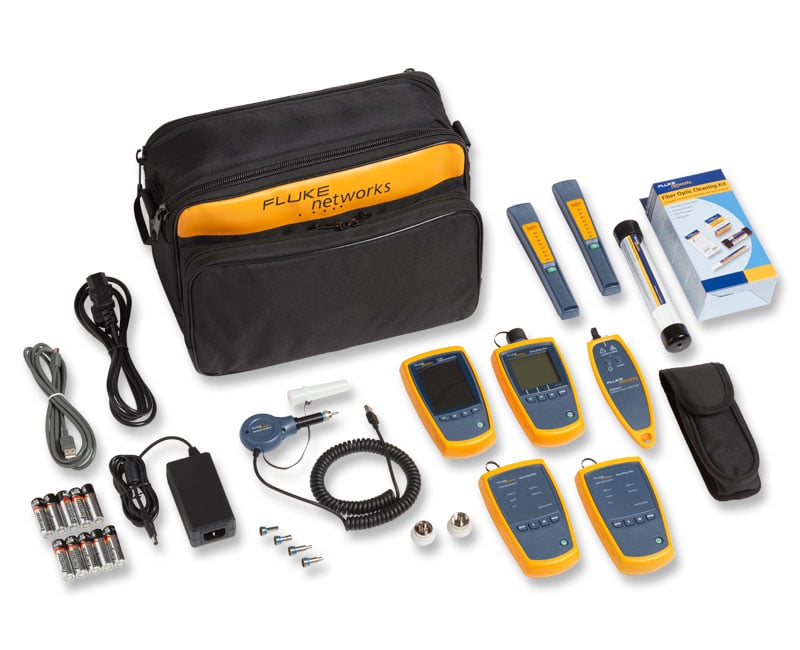
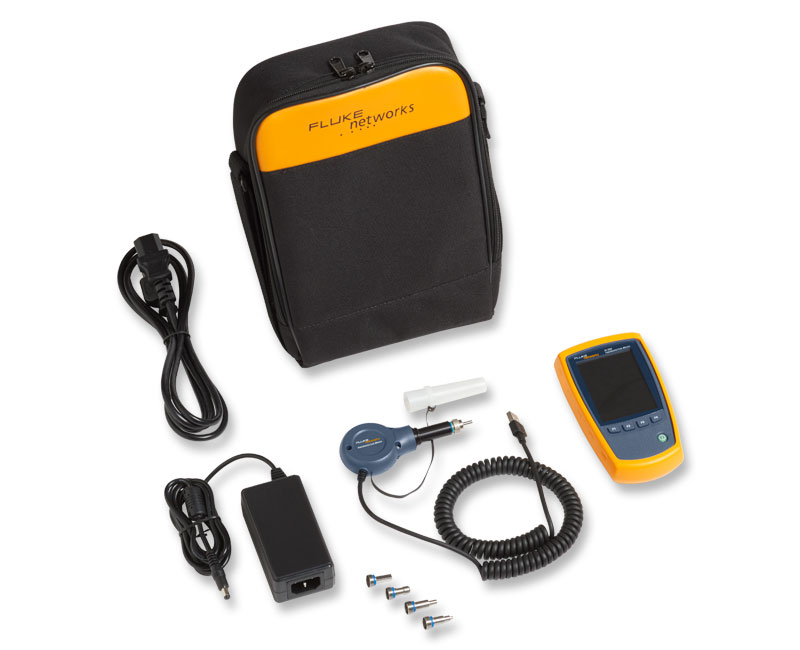
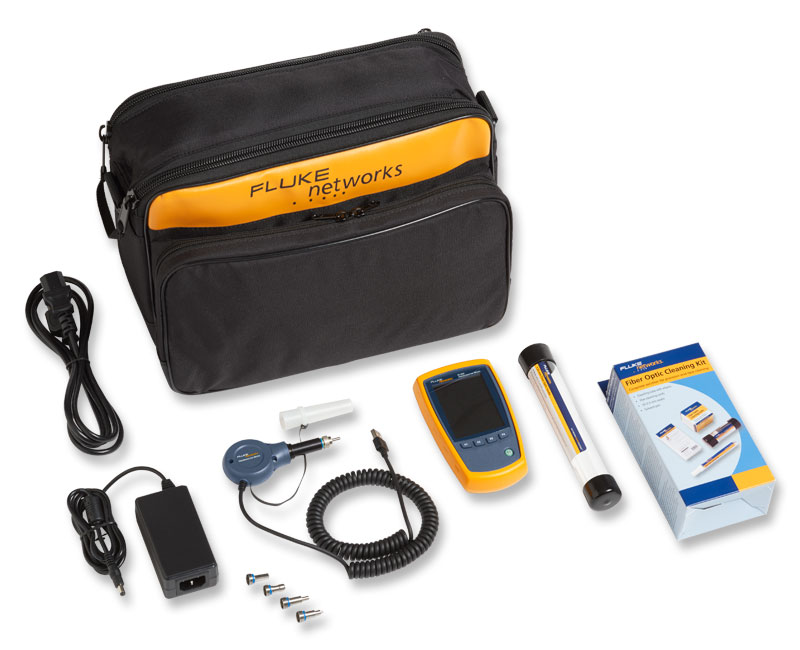
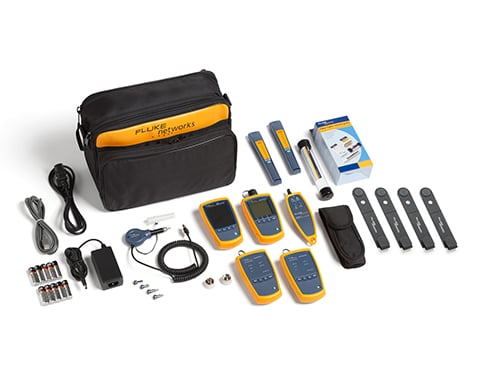
The Complete Fiber Verification Kit is for contractors and network technicians who install and maintain premises networks with both multimode and singlemode optical fiber. Use this kit to verify optical loss and power levels at 850, 1300, 1310, and 1550 nm, inspect fiber end-faces, locate cable faults, connector problems, and polarity issues. Kit includes FI-500 FiberInspector Micro.
Complete Fiber Verification Kit (FTK1450)
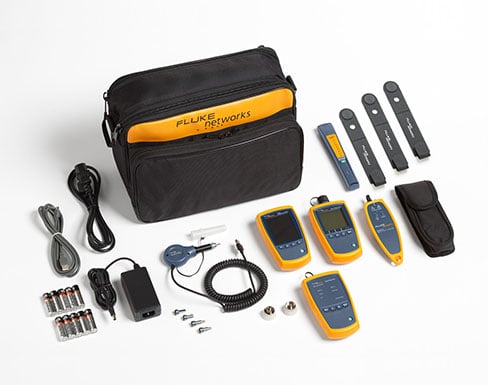
The Complete Fiber Verification Kit is for contractors and network technicians who install and maintain premises networks with both multimode and singlemode optical fiber. Use this kit to verify optical loss and power levels at 850, 1300, 1310, and 1550 nm, inspect fiber end-faces, locate cable faults, connector problems, and polarity issues. Kit combinations offer a variety of inspection options.
Full-Featured Inspection and Multimode Verification Kits (FTK1375)
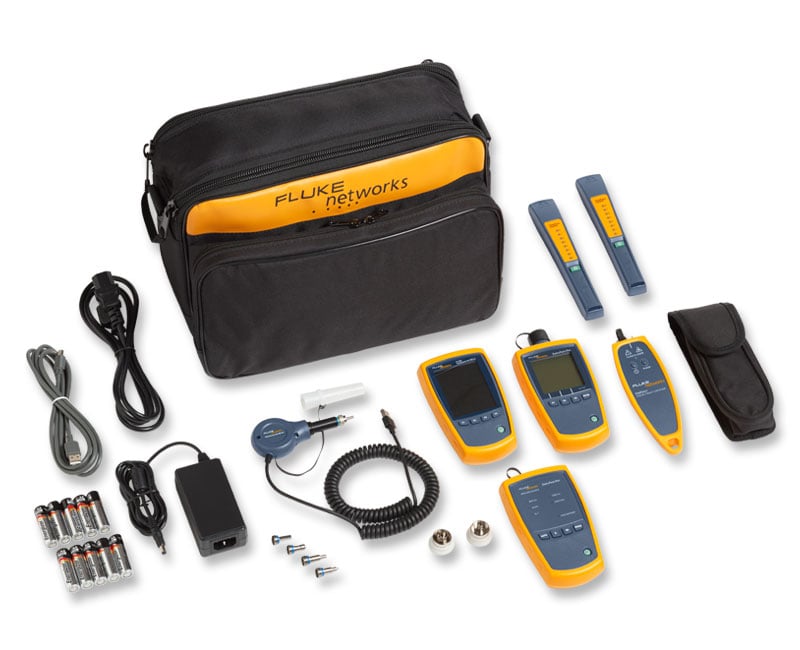
The Full-Featured Inspection and Multimode Verification Kits are for contractors and network technicians who install and maintain multimode premises networks. Use these kits to verify optical loss and power levels at 850 and 1300 nm, inspect fiber end-faces, locate cable faults, connector problems, and polarity issues. Kit includes FI-500 FiberInspector Micro.
Full-Featured Inspection and Multimode Verification Kits (FTK1300 and FTK1350)
The Full-Featured Inspection and Multimode Verification Kits are for contractors and network technicians who install and maintain multimode premises networks. Use these kits to verify optical loss and power levels at 850 and 1300 nm, inspect fiber end-faces, locate cable faults, connector problems, and polarity issues. Kit combinations offer a variety of inspection options.
Basic Verification Kits (FTK1000-MM and FTK2000-SM)
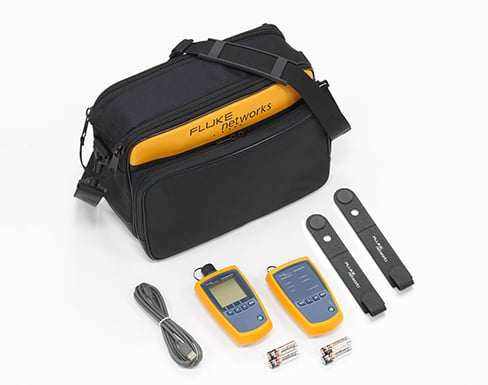
The Basic Verification Kits are great starter kits for contractors and network technicians who install and maintain fiber links. Available in singlemode or multimode configurations, quickly verify optical loss and power levels at 850 and 1300 nm or 1310 and 1550 nm. Add additional sources, microscopes, and VFL options as needed.
Copper and Fiber Technician's Kit (CIQ-FTKSFP)
Consisting of the CableIQ (CIQ-KIT) and the SimpliFiber Pro Basic Verification Kit (FTK1000), Fluke Networks' Copper and Fiber Technician's Kit provides a robust combination of tools to help you expertly manage your network to it keep it running smoothly and inexpensively. Simple-to-use straight from the box, you can do everything from quickly troubleshooting and qualifying cabling link bandwidth to verifying optical fiber power and loss.
Fiber Inspection
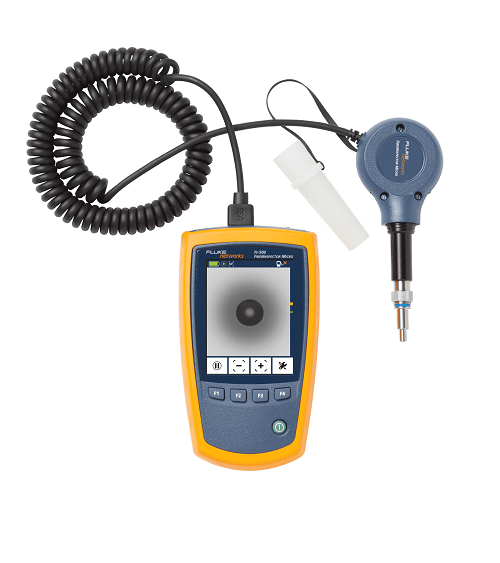
The FI-500 FiberInspector Micro fills the gap between a manual scope and a fully automated inspection scope. The FI-500 has the simplicity and practicality of a manual inspection scope, but with advanced features to reduce troubleshooting and inspection time. The built-in PortBright flashlight helps you find the right port or cable. The small-profile probe fits into tight spots, and features pushbutton controls for simple operation. Autofocus provides a sharp view of the endface in a few seconds, while the pause button freezes the image and automatically centers the fiber ferrule on the crisp 320 x 240 display for more detailed inspection
Fiber Cleaning
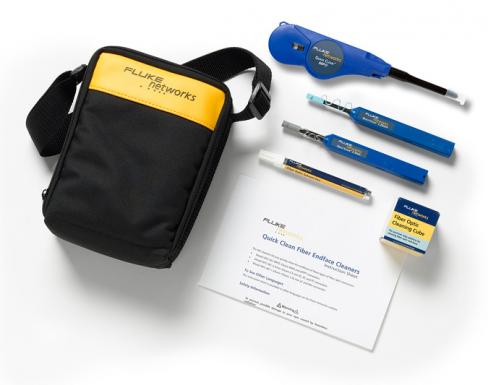
An important addition to your verification, troubleshooting, and inspection tasks is fiber cleaning. Dirt, dust, and other contaminants are the enemy of high-speed data transmission over optical fiber. Today's network applications require more bandwidth, making loss budgets tighter than ever. It is critical that all optical connections are clean and free of contaminants to ensure application success. Fluke Networks’ Fiber Optic Cleaning Kits have the best tools to effectively remove the toughest contaminants with ease.
FI-500 FiberInspector Micro
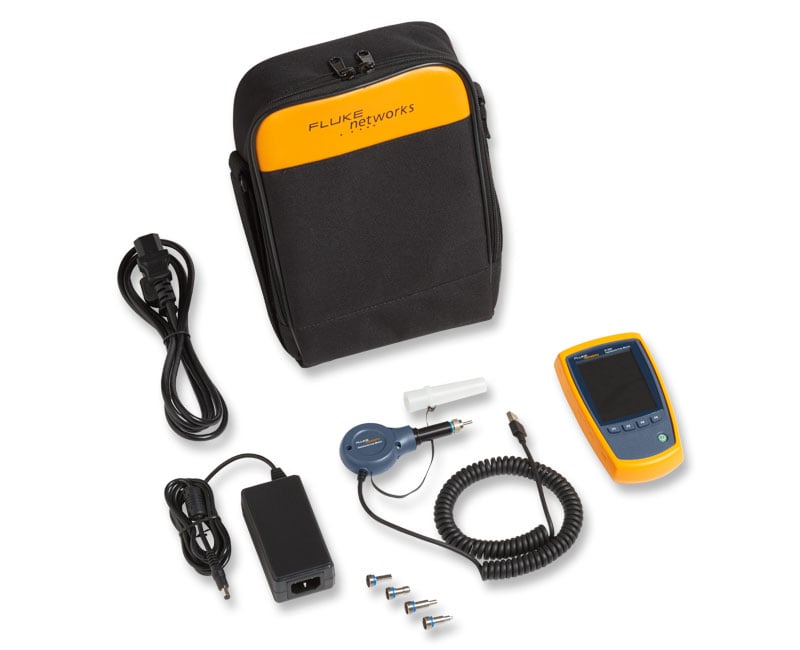
FI-500 FiberInspector Micro - includes 4 tips (1.25 mm, 2.50 mm, SC, LC), case, rechargeable batteries and universal power adapter
NFC-KIT-BOX
Fiber Optic Cleaning Kit includes cleaning cube with wipes, five cards with sealed cleaning zones, solvent pen and 2.5mm port cleaning swabs.

NFC-KIT-CASE
Fiber Optic Cleaning Kit includes cleaning cube with wipes, ten cards with sealed cleaning zones, solvent pen, 2.5 mm port cleaning swabs and 1.25 mm port cleaning swabs in a rugged carrying case.

Results Management
Manage fiber test results with LinkWare Cable Test Management Software.
Fluke Networks' powerful LinkWare software helps you quickly organize, edit, view, print, save, or archive test results by job site, customer, campus building, and more. You can merge test results into an existing database and then sort, search, and organize by any number of data fields or parameters. LinkWare is available free from our web site. As a contractor, once your work is done, you can give this powerful application to your customer so they can have instant access to the data electronically or you can export the data as an Adobe Portable Document Format (PDF).
Extensive data management capabilities with LinkWare:
- Manage copper and fiber test results with a single software application that supports Fluke Networks' entire line of cable testers
- Deliver professional, customized, graphic reports in a common format for all Fluke Networks cable testers
- Ensure standards compliance with the ability to configure and print TIA 606-A documentation
- New drag-and-drop feature makes it easier to manage and organize multiple projects
- Count on compatibility with major CMS (cable management software) applications
- Increase productivity with simple user interface and time-saving features with LinkWare, the world's preferred cable test management software
LinkWare prints professional, graphical reports with color graphs depicting the measured test parameters. You can choose which parameters to print and the order in which graphs appear. Reports can also be customized with your company logo.
LinkWare Stats provides a graphical analysis of your entire cable plant
LinkWare now supports LinkWare Stats, an automated statistical report option that allows you to move above and beyond the page-per-link report and see your entire cabling infrastructure. It analyzes and transforms LinkWare cable test data into graphics that reveal your cabling plant performance-summarizing your entire cabling infrastructure in a compact, graphical format that makes it easy to verify margins and spot anomalies. See what LinkWare Stats can do with your data - a free demo version of LinkWare Stats is included with every copy of LinkWare.

Verify and Locate Faults
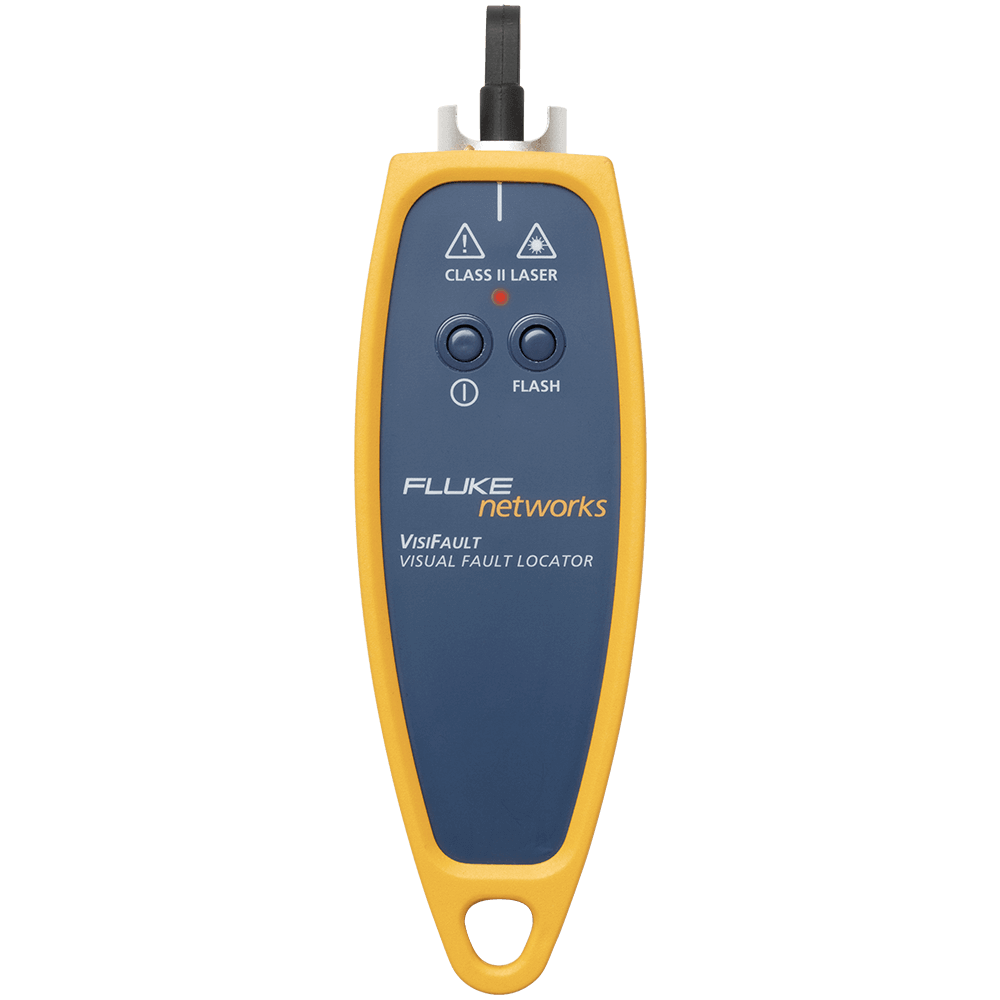
The laser-powered VisiFault™ Visual Fault Locator verifies continuity and polarity, and helps find breaks and bends in cables, and locate problems in connectors and splices. VisiFault emits a bright beam of red light easily visible from a distance. Connect the VisiFault to one end of a fiber - then locate that fiber at the other end, even if it is one of many fibers either in a cable or terminated in a rack. Perform simple end-to-end continuity checks. VisiFault can quickly illuminate fiber breaks, damaged connectors on patch cords, defective splices in splice trays, and tight fiber bends in and around equipment racks. The choice of a continuous wave output mode for steady fault illumination or a flashing output mode makes for easier fault location. The integrated universal 2.5 mm adapter makes for easy connection to SC, ST, FC, and FJ connectors. The optional 1.25 mm adapter allows for connection to LC and MU connectors. Attach the VisiFault to your belt using a lanyard or in the carrying case so it is always on hand when you need it. Long battery life for hours of use, includes two AA batteries giving you more than 80 hours of continuous mode battery life.
Fluke Networks built the VisiFault to last.
VisiFault incorporates an energy-absorbing holster over an impact-resistant case to withstand drops, impacts and rough treatment. Together with a heavy-duty tethered end cap to protect the fiber adapter, VisiFault is the VFL for demanding field applications. Unlike more fragile VFLs that utilize a flashlight body or plain plastic case, Fluke Networks engineered the VisiFault custom-case to be compact, ergonomic and mechanically tough for field use.

Unique Capabilities
Time-saving capabilities such as CheckActive™, FindFiber™, and Min/Max make SimpliFiber Pro the best fiber test kit on the market.
CheckActive™
What is it? The SimpliFiber Pro power meter emits an audible tone and displays an icon when a live link or port is detected.
How will it save time? This feature provides quick confirmation of whether a link or port is live. No power measurement set up is required.

FindFiber™
What is it? Identifies cabling runs and ensures polarity.
How will it save time? This feature provides fast cable-routing identification with just one technician, enabling easy cable-mapping verification and documentation.

Min/Max
What is it? Tracks a testing session’s power fluctuations.
How will it save time? This feature accurately identifies intermittent power fluctuations and eliminates unreliable and inaccurate guesswork. It also eliminates the need for constant monitoring due to the auto-pilot tracking feature.

Models & Accessories
Models
SFMULTIMODESOURCE
SFMULTIMODESOURCE
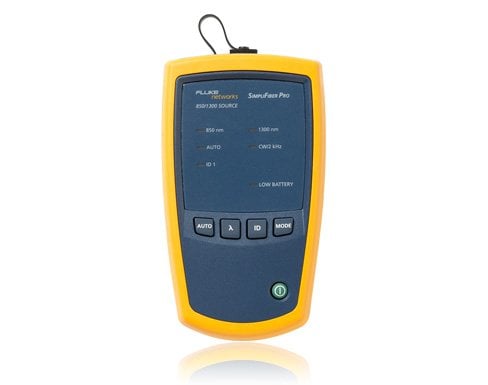
SimpliFiber Pro multimode 850/1300 light source. Fixed SC port (with ST and LC testing capability available using hybrid test-reference cord accessories purchased separately). Includes FindFiber TM See Kits section for Gold coverage models
Learn more about Fluke Premium Care – Gold
SFPOWERMETER GOLD
SFPOWERMETER Gold Support
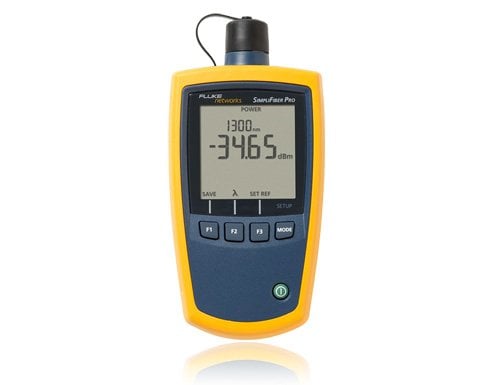
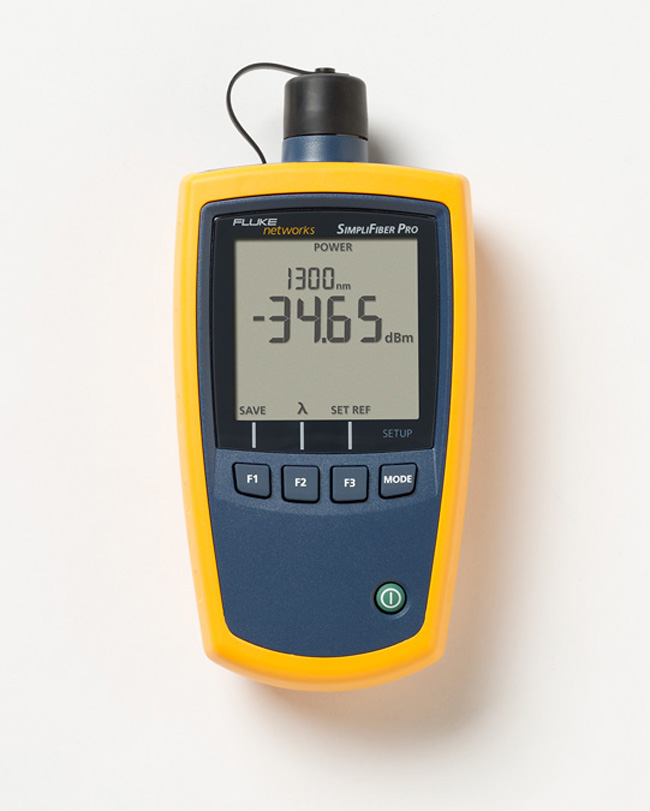
SimpliFiber Pro optical power meter; SC adapter included. See Photo
Learn more about Fluke Premium Care – Gold
GLD-FTK-PM
1 YEAR GOLD FOR FTK POWER METER (EXCLUDES SOURCES, VFL AND FINDFIBER)
GLD3-FTK-PM
3 YR GOLD FOR FTK POWER METER (EXCLUDES SOURCES, VFL AND FINDFIBER)
SFSINGLEMODESOURCE
SFSINGLEMODESOURCE
SimpliFiber Pro singlemode 1310/1550 laser light source. Fixed SC port (with ST and LC testing capability available using hybrid test-reference cord accessories purchased separately). Includes FindFiber TM See Kits section for Gold coverage models
Learn more about Fluke Premium Care – Gold
LIQ-KIT-FTK1475
LIQ-KIT-FTK1475
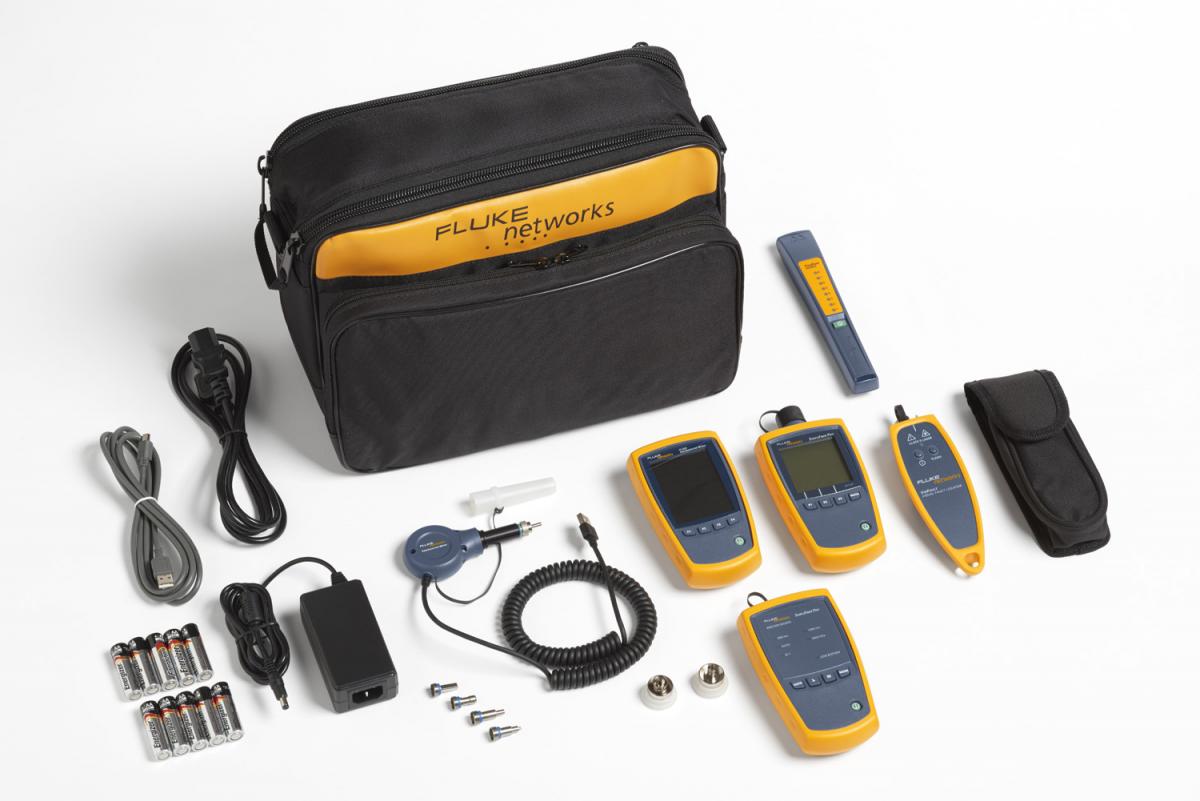
Network Troubleshooting Professional Kit includes LinkIQ Cable+Network tester includes LinkIQ with remote IDs #1-7, RJ45-RJ45 patch cord, AC charger, RJ45/11 universal coupler; IntelliTone Pro 200 probe and duffle bag carrying case; SimpliFiber Pro optical power meter, 850/1300 multimode source, 1310/1550 single-mode source; VisiFault Visual Fault Locator with 2.5mm universal adapter, two AAA batteries, two (2) FindFiber Remote ID sources, magnetic strap attachments and carrying case; SC, ST, and LC power meter adapters; FiberInspector Micro with Probe, Display, 4 UPC tips (LC bulkhead, SC bulkhead, 1.25mm end face adapters and 2.50mm end face adapters), rechargeable batteries and universal power adapter; NFC-KIT-BOX fiber optic cleaning kit. See Photo
Learn more about Fluke Premium Care – Gold
Kits
MS2-FTK
MS2-FTK
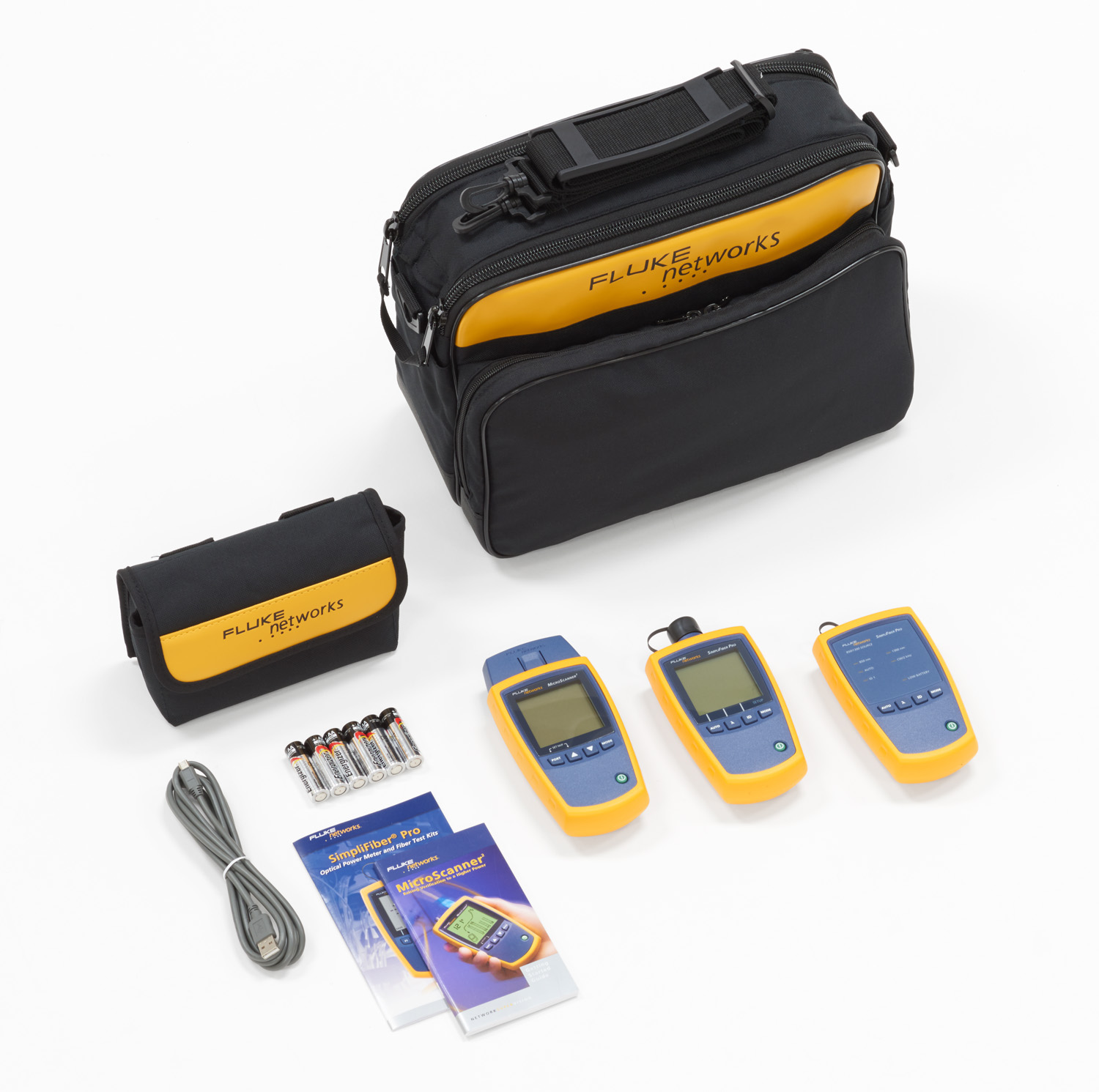
Copper and Fiber Basic Technician’s Kit – Includes the MicroScanner (MS2-100) and SimpliFiber Pro (FTK1000) Fiber Test Kit. See Photo
Learn more about Fluke Premium Care – Gold
FTK1000 GOLD
FTK1000 Gold Support
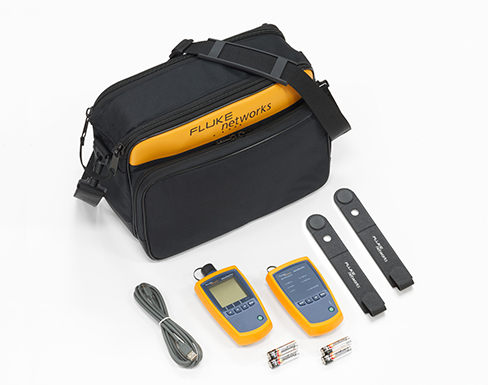
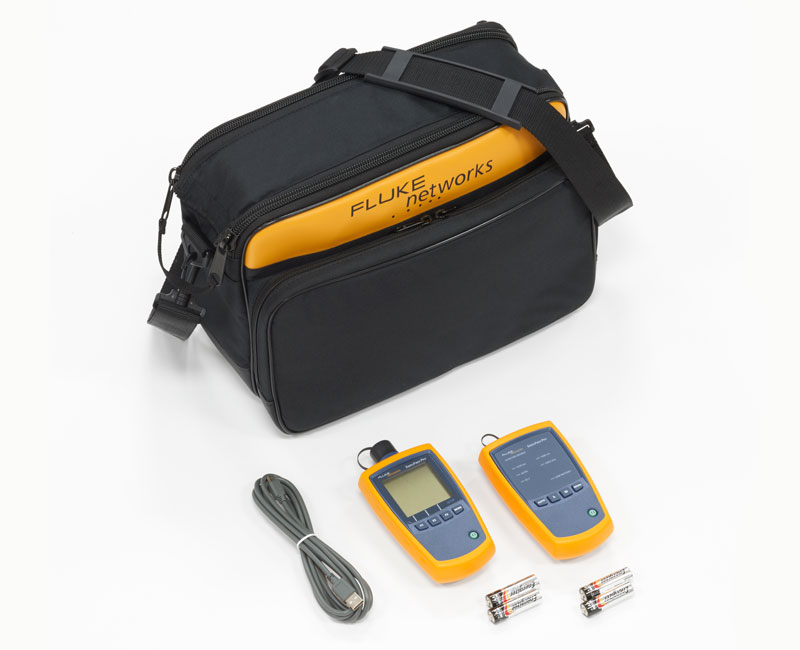
Multimode Fiber Verification Kit – Includes SimpliFiber Pro optical power meter, 850/1300 multimode source, Magnetic strap attachments, carrying case, and SC power-meter adapter. See Photo
Learn more about Fluke Premium Care – Gold
GLD-FTK-2
1 YEAR GOLD FOR FTK1000 to 1375, 2000 (EXCLUDES VIDEO, VFL AND FINDFIBER)
GLD3-FTK-2
3 YEAR GOLD FOR FTK1000 to 1375, 2000 (EXCLUDES VIDEO, VFL AND FINDFIBER)
FTK2000 GOLD
FTK2000 Gold Support
Singlemode Fiber Verification Kit – Includes SimpliFiber Pro optical power meter, 1310/1550 singlemode source, carrying case, and SC power-meter adapter. See Photo
Learn more about Fluke Premium Care – Gold
GLD-FTK-2
1 YEAR GOLD FOR FTK1000 to 1375, 2000 (EXCLUDES VIDEO, VFL AND FINDFIBER)
GLD3-FTK-2
3 YEAR GOLD FOR FTK1000 to 1375, 2000 (EXCLUDES VIDEO, VFL AND FINDFIBER)
FTK1475 GOLD
FTK1475 Gold Support
Complete Fiber Verification Kit with FI-500 FiberInspector Micro – Includes SimpliFiber Pro optical power meter, 850/1300 multimode source, 1310/1550 singlemode source, VisiFault VFL, FI-500 FiberInspector, two (2) FindFiber Remote ID sources, Magnetic strap attachments and carrying case; SC, ST, and LC power meter adapters, NFC-KIT-BOX fiber optic cleaning kit. See Photo
Learn more about Fluke Premium Care – Gold
GLD-FTK-3
1 YR GLD-FTK1450,1475 (EXCL VIDEO,VFL, FINDFIBER)
FTK1375 GOLD
FTK1375 Gold Support
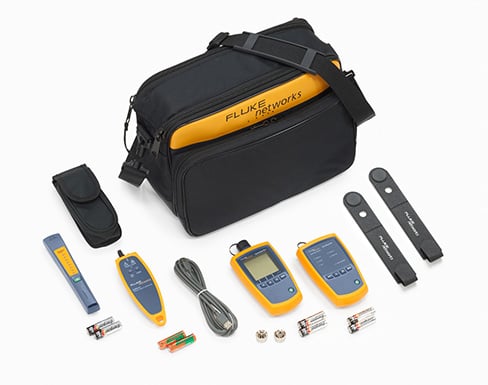
Multimode Fiber Verification Kit with FI-500 FiberInspector Micro – Includes SimpliFiber Pro optical power meter, 850/1300 multimode source, VisiFault VFL, FI-500 FiberInspector, FindFiber Remote ID source, and carrying case; SC, ST, and LC power meter adapters. See Photo
Learn more about Fluke Premium Care – Gold
GLD-FTK-2
1 YEAR GOLD FOR FTK1000 to 1375, 2000 (EXCLUDES VIDEO, VFL AND FINDFIBER)
GLD3-FTK-2
3 YEAR GOLD FOR FTK1000 to 1375, 2000 (EXCLUDES VIDEO, VFL AND FINDFIBER)
FTK1200 GOLD
FTK1200 Gold Support
Multimode Fiber Verification Kit with Visifault - Includes Simplifiber Pro optical power meter, 850/1300 multimode source, Visifault VFL, FindFiber Remote ID source, Magnetic strap attachments, and carrying case; SC, ST, and LC power meter adapters also included See Photo
Learn more about Fluke Premium Care – Gold
GLD-FTK-2
1 YEAR GOLD FOR FTK1000 to 1375, 2000 (EXCLUDES VIDEO, VFL AND FINDFIBER)
GLD3-FTK-2
3 YEAR GOLD FOR FTK1000 to 1375, 2000 (EXCLUDES VIDEO, VFL AND FINDFIBER)
Accessories
FINDFIBER-6
FINDFIBER-6
NFC-Kit-Box
NFC-Kit-Box
FINDFIBER
FINDFIBER
NFC-Kit-Case
NFC-Kit-Case
NFA-SC-SINGLE
NFA-SC-SINGLE
NFA-LC-SINGLE
NFA-LC-SINGLE
NFA-ST-SINGLE
NFA-ST-SINGLE
NFA-FC-SINGLE
NFA-FC-SINGLE
MRC-50-EFC-SCSC
MRC-50-EFC-SCSC
MRC-50-EFC-SCLC-M
MRC-50-EFC-SCLC-M
MRC-50-EFC-SCFC
MRC-50-EFC-SCFC
MRC-50-EFC-SCST
MRC-50-EFC-SCST
MRC-625-EFC-SCSC
MRC-625-EFC-SCSC
MRC-625-EFC-SCLC-M
MRC-625-EFC-SCLC-M
MRC-625-EFC-SCFC
MRC-625-EFC-SCFC
MRC-625-EFC-SCST
MRC-625-EFC-SCST
SRC-9-SCSC
SRC-9-SCSC
SRC-9-SCLC-M
SRC-9-SCLC-M
SRC-9-SCFC
SRC-9-SCFC
SRC-9-SCST
SRC-9-SCST
MRC-50-SCSC
MRC-50-SCSC
MRC-50-LCLC-M
MRC-50-LCLC-M
MRC-50-FCFC
MRC-50-FCFC
MRC-50-STST
MRC-50-STST
MRC-625-SCSC
MRC-625-SCSC
MRC-625-LCLC-M
MRC-625-LCLC-M
MRC-625-FCFC
MRC-625-FCFC
MRC-625-STST
MRC-625-STST
SRC-9-LCLC-M
SRC-9-LCLC-M
SRC-9-FCFC
SRC-9-FCFC
SRC-9-STST
SRC-9-STST
FI-500
FI-500
FI-525
FI-525
MS2-MAG-KIT
MS2-MAG-KIT
Specifications
Environmental Specifications
| Operating Temperature | -10º C to 50º C |
| Storage Temperature | -20º C to 50º C |
| Operating Humidity | 95% (10º C to 35º C) Non-Condensing 75% (35º C to 40º C) Non-Condensing Uncontrolled |
| EMI, RFI, EMC | Standards compliant 1 |
| 1Conforms to relevant European Union directives; Conforms to relevant Australian standards; Listed by the Canadian Standards Association; Complies with 21CFR.1040.10,11, and EN60825-1, 2:2007 (Class 1, Hazard Level 1) | |
Optical Power Meter
| Detector Type | InGaAs |
| Calibrated Wavelengths | 850 nm, 1300 nm, 1310 nm, 1490 nm, 1550 nm, 1625 nm |
| Measurement Range | +10 to -52 dBm (850 nm) +10 to -60 dBm (1300, 1310, 1490, 1550, 1625 nm) |
| Power Measurement Linearity | ±0.2 dB (850 nm); ±0.1 dB (1300, 1310, 1490, 1550, 1625 nm) |
| Power Measurement Uncertainty3 | ±0.25 dB |
| Display Resolution, dB or dBm | 0.01 dB |
| Auto Dual-Wavelength Switching | Yes |
| Power Display Units | dBm, mW, μW |
| Auto-Wavelength Detection | Yes |
| Data Storage | 1000 records, multiple wavelengths per record |
| External Interface | USB, 2.0 full speed |
| Optical Connector | Removable adapter, SC adapter as default, optional adapters include LC, ST |
| Display update rate | 1 reading per second |
| Reference | Individually set for each wavelength |
| FindFiber ID detection | Yes |
| Power Requirement | 2 AA Alkaline batteries |
| Battery Life4 | > 50 Hours (typical) |
| Automatic Power Off | 10, 20, 30 or 60 minutes (can be disabled by user) |
| Low Battery Warning | Yes, low battery icon blinks |
| Size (L x W x H) | 6.4 in x 3.2 in x 1.5 in (16.5 cm x 8.0.cm x 3.9 cm) |
| Weight | 11.5 oz (325 grams) |
Multimode Optical Source
| Emitter Type | LED |
| Central Wavelength | 850 nm, 1300 nm |
| Wavelength Accuracy | 850 nm: +/-30 nm; 1300 nm: +/- 20 nm |
| Spectral Width (FWHM) | 850 nm: 50 nm (typical); 1300 nm: 135 nm (typical) |
| Minimum Output Power | 850/1300 nm: ³ -20 dBm |
| Power Output Stability1 | ±0.1 dB over 8 hours |
| Auto Dual-Wavelength Switching | Yes. Can be enabled/disabled by user. |
| Optical Output Connector | Fixed SC |
| FindFiber Code Generation | Yes. Fixed at ID 1. |
| Modes | CW, 2 kHz modulated, Auto-wavelength |
| Power Requirement | 2 AA Alkaline batteries. |
| Battery Life2 | 40 hrs (typical) |
| Automatic Power Off | 30 minutes (can be disabled by user) |
| Low Battery Warning | Yes, LED blinks |
| Size (L x W x H) | 5.6 in x 3.2 in x 1.6 in (14.2 cm x 8.1 cm x 4.1cm) |
| Weight | 1.8 oz (278 g) |
Singlemode Optical Source
| Wavelength Accuracy | 1310 nm: +/- 20 nm; 1550 nm: +/- 30 nm |
| Spectral width (RMS) | 1310 nm: 2 nm (maximum); 1550 nm: 3 nm (maximum); 1490 nm/1625 nm: 1 nm (maximum) |
| Power Output Stability1 | ±0.25 dB over 8 hours |
| Auto Dual-Wavelength Switching | Yes. Can be enabled or disabled by user. |
| Optical Connector | Fixed SC |
| Launch Condition | 9/125 μm fiber |
| Modes | CW, 2 kHz modulated, Auto-wavelength |
| Power Requirement | 2 AA Alkaline batteries |
| Battery Life2 | 30 hrs (typical) |
| Automatic Power Off | 30 minutes (can be enabled or disabled by user) |
| Low Battery Warning | LED blinks. |
| Size (L x W x H) | 5.6 in x 3.2 in x 1.6 in (14.2 cm x 8.1 cm x 4.1cm) |
| Weight | 9.8 oz (278 grams) |
FindFiber Source Specifications
| Emitter Type | Laser |
| Source Connector | Fixed SC |
| FindFiber Code Generation | 1 through 8. Default is 3. |
| Power On/Low-battery Indicator | LED |
| Power Requirement | 2 AA Alkaline batteries |
| Battery Life | > 80 Hours (typical) |
| Automatic Power Off | 30 minutes |
| Low Battery Warning | LED blinks |
| Size (L x W x H) | 7.1 in x 1.3 in x 1.0 in (17.9 cm x 3.2 cm x 2.5 cm) |
| Weight | 4.4 oz (125 g) |
| Safety | Meets Class 1 CDRH |
Documents
Manuals
- FindFiber Source Instruction Sheet, Rev. 1 User documentation
- SimpliFiber Pro Multimode Source Instruction Sheet, Rev. 2 User documentation
- SimpliFiber Pro Getting Started Guide, Rev. 3 User documentation
- SimpliFiber Pro Singlemode Source Users Guide, Rev. 3 User documentation
- SimpliFiber Pro Users Manual, Rev. 3 User documentation
- FiberLert-125 QRG
- FiberLert-125 Safety Information
Data Sheets
White Papers
Application Notes
- Application Note: How to Choose the Right Power Meter Light Source Top 4 Questions to Ask a Power Meter Light Source Vendor
- Encircled Flux Application Note How will Encircled Flux launch conditions improve my link loss measurements?
- Fiber Testing Best Practices - Pocket Guide Request your 4” x 6”, sturdy pocket guide that is ideal to take on all your fiber jobs. Includes a quick-action summary and checklist, this guide is an invaluable tool to ensure you never miss a critical step during your fiber testing or troubleshooting.
Catalogs
手册
Handbücher
- FindFiber Source Gebrauchsanweisung, Rev. 1
- SimpliFiber Pro Bedienungshandbuch, Rev. 3
- SimpliFiber Pro Handbuch „Erste Schritte“, Rev. 3
- SimpliFiber Pro Multimode Source Bedienungsanleitung, Rev. 2
- SimpliFiber Pro Singlemode Source Bedienungsanleitung, Rev. 3
- FiberLert-125 QRG
- FiberLert-125 Sicherheitsinformationen
Datenblätter
Manuales
- Guía de funcionamiento básico de SimpliFiber Pro, Rev. 3
- Guía de uso de fuente de monomodal SimpliFiber Pro, Rev. 3
- Guía de uso de SimpliFiber Pro Multimode Source, Rev. 2
- Instrucciones de FindFiber Source, Rev. 1
- Manual de uso de SimpliFiber Pro, Rev. 3
- FiberLert-125 QRG
- FiberLert-125 Información sobre seguridad
Fichas técnicas
Manuels
- Guide d´introduction SimpliFiber Pro, Rév. 3
- Guide d’utilisateur de source monomode SimpliFiber Pro, Rév. 3
- Guide d’utilisateur SimpliFiber Pro Multimode Source, Rév. 2
- Mode d’emploi FindFiber Source, Rév. 1
- Mode d’emploi SimpliFiber Pro, Rév. 3
- FiberLert-125 QRG
- FiberLert-125 Consignes de sécurité
Fiches techniques
マニュアル
- FindFiber Source 取扱説明書, Rev. 1
- SimpliFiber Pro Multimode Source ユーザーズ・ガイド, Rev. 2 (Users Guide)
- SimpliFiber Pro スタート・ガイド, Rev. 3 (Start Guide)
- SimpliFiber Pro Singlemode Source ユーザーズ・ガイド, Rev. 3 (Users Guide)
- SimpliFiber Pro ユーザーズ・マニュアル, Rev. 3 (Users Manual)
- FiberLert-125 QRG (クイック・リファレンス・ガイド)
- FiberLert-125 安全性に関する情報
データシート
Manuais
- Folha de instruções do FindFiber Source, Rev. 1
- Guia de Introdução do SimpliFiber Pro, Rev. 3
- Guia do usuário do fonte de monomodo SimpliFiber Pro, Rev. 3
- Guia do usuário do SimpliFiber Pro Multimode Source, Rev. 2
- Manual do Usuário do SimpliFiber Pro, Rev. 3
- FiberLert-125 QRG
- FiberLert-125 Informações de segurança
Knowledge Base
Unlimited access to our Knowledge Base - You'll have an open door to valuable proprietary information we've gathered from helping customers over the years. It also includes helpful technical articles written by our experts.
Learn More >Gold Product Support
Gold Support for your SimpliFiber Pro Optical Power Meter & Fiber Test Kits allows you to make the most of your SimpliFiber Pro purchase while ensuring a higher return on your investment. You will minimize your downtime, receive faster trouble resolution and have total access to all support resources.

Annual Calibration and Factory Refresh
Keeping your SimpliFiber Pro calibrated is critical to ensure accuracy when testing fiber. Our calibration processes are controlled and designed to certify that your SimpliFiber Pro meets all published specifications. Typical turnaround time for a calibration is 5 working days. Your SimpliFiber Pro will be calibrated to factory specifications (calibration certificate provided), upgraded with all of the latest software and firmware then cleaned and performance verified. In addition, all accessories that came with your SimpliFiber Pro will be tested and replaced if faulty or defective.
Repairs and loaner equipment
If your SimpliFiber Pro Optical Power Meter & Fiber Test Kits should fail and need repaired, you will receive a replacement unit to keep - all shipping paid by Fluke Networks.
Accessory Replacement
Some accessories are essential to testing fiber. If any accessory that comes with your SimpliFiber Pro model are qualified as defective or faulty by our technical assistance center, it will be replaced free of charge.
Access to live 24 x 7 technical support
Extend the expertise of your staff. Gold Support includes priority access to our world-class Technical Assistance Center (TAC). Our centers in Seattle, WA and Eindhoven, NL employ a full staff of highly trained technical experts that are on call, including weekends and through the night, to answer complex troubleshooting questions, including GOLD only services such as: Test set-up and instrument configuration, Fiber testing and reference setting, Test results interpretation, including trace results analysis.
Unlimited access to our Knowledge Base
You'll have an open door to valuable proprietary information we've gathered from helping customers over the years. It also includes helpful technical articles written by our experts.
Member Only promotions
Your membership qualifies you for "Members Only" promotions and programs. This includes product discounts, access to reconditioned equipment at special prices and other incredible values.
Ensure that you are getting the most out of your SimpliFiber Pro Optical Power Meter & Fiber Test Kits with Gold Support Services.
Request Gold Quote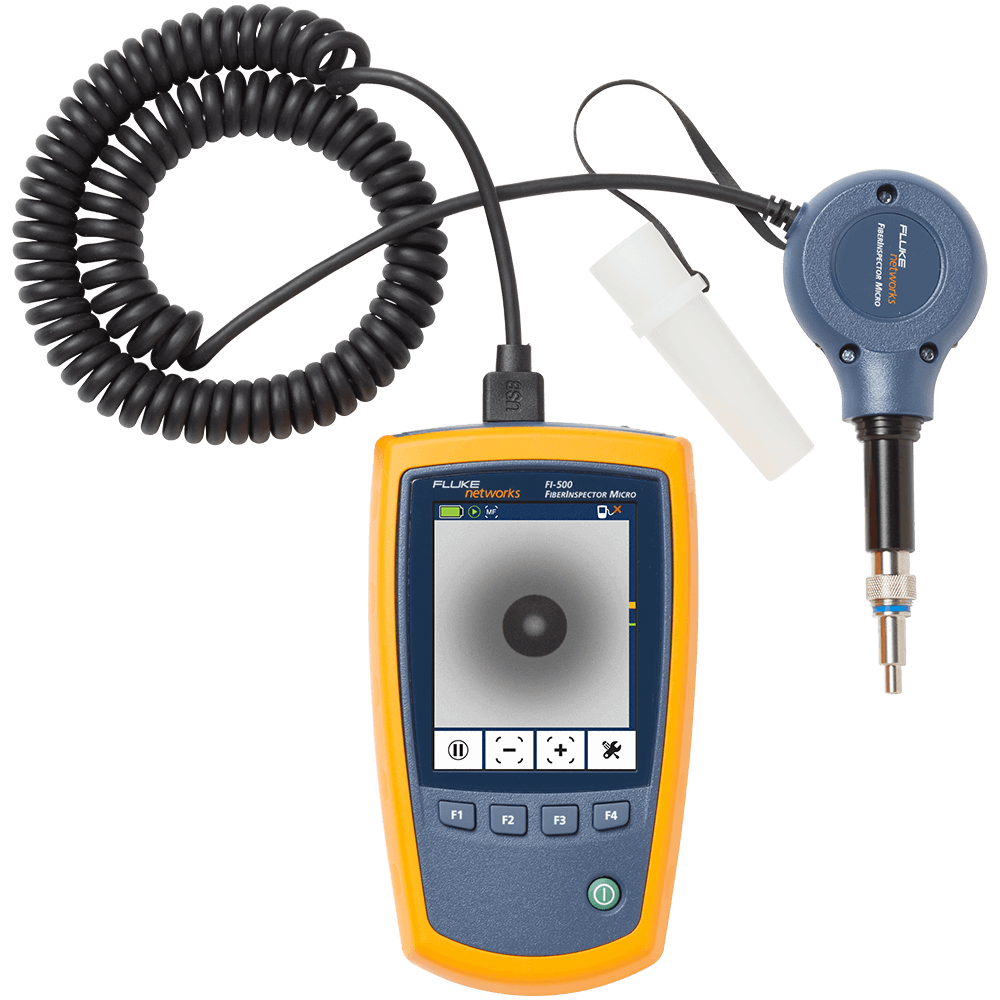

.jpg)