
This article describes the correct method for certifying duplex LC/APC to LC/UPC single mode using the CertiFiber Pro. This method meets the requirements of ANSI/TIA and ISO/IEC standards. It is also the method required for warranty applications with cabling vendors. As with all fiber testing, inspection is a critical component to successful certification. Without inspection, you may end up damaging the installed connectors. The CertiFiber Pro has a USB camera option for the inspection of end face connectors. Users are encouraged to take advantage of this. Additionally, the CertiFiber Pro with the USB camera option can automatically grade a fiber end face to IEC 61300-3-35 Ed 3, in around one second. Various tips are available including APC and UPC.
Before proceeding to test, ensure you have the correct test limit configured for your CertiFiber Pro. We cannot tell you which test limit to select as cabling vendors offering warranties often have stricter requirements than those found in ANSI/TIA and ISO/IEC standards. In this example, we shall use ANSI/TIA-568.3-E as our test limit. If you are using ISO/IEC limits or vendor specific limits, the test methodology described here is the same. Failing to use a 1 jumper reference for the testing of installed links could result in the rejection of your warranty application. It could also lead to negative loss results.
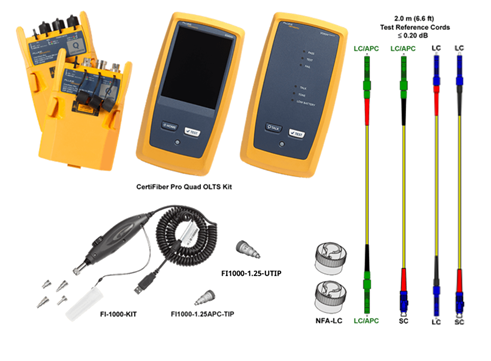
Test reference cords (TRCs) If the TRCs are bad, your test results will be bad too. It represents the largest volume of calls for support. The Fluke Networks TRCs use reference grade connectors (≤ 0.20 dB) in accordance with IEC 61280-4-2 and ANSI/TIA-526-7-A standards. Note that patch cords from a distributor are typically rated ≤ 0.50 dB and may provide pessimistic results. For testing this hybrid link you will need both the standard single mode LC TRC and the LC APC TRC cords.
- SRC-9-SCLCAPCKIT-M: Single mode TRC KIT 2 m (2 SCUPC/LCAPC, 2 LCAPC/LCAPC)
- SRC-9-SCLC-M: Single mode test reference cord (2 m) for testing LC terminated fibers (SC/Metal LC)
- SRC-9-LCLC-M: Single-mode test reference cord (2 m) for testing LC terminated fibers (Metal LC/Metal LC)
Setting up your CertiFiber Pro
- Tap PROJECT > CHANGE PROJECT > NEW PROJECT.
- Enter a name for your project "KB Article Example" followed by DONE. (It can be renamed later if necessary)
- With the fiber module inserted you will see the following screen:
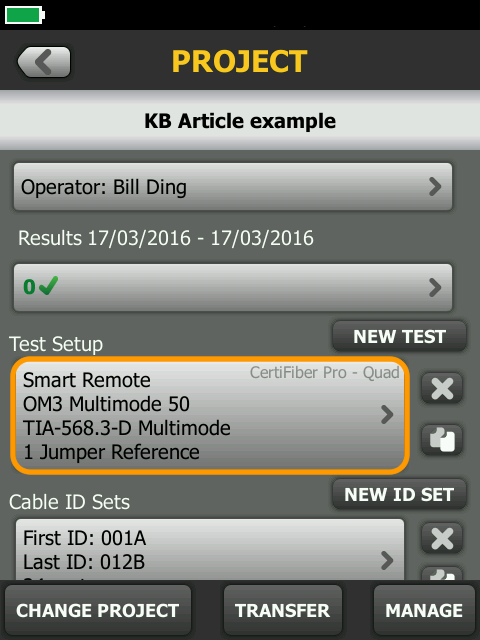
If not, tap the area under Test Setup > Module and change to CertiFiber Pro.
- Tap Smart Remote above to see the following options:
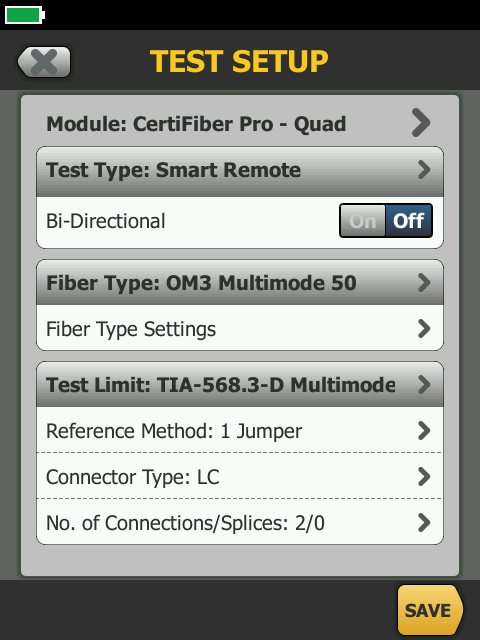
- Tap Fiber Type and select a single mode cable - this will then allow you to select single mode test limits.
- Test Type: This governs the type of test. Since we are testing a duplex link, leave it as Smart Remote.
- Bi-Directional: The standards and most cabling vendors do not require this for Tier 1 testing - check your test specification.
- Fiber Type: This changes the refractive index setting which is used to determine the length of the fiber under test.
- Test Limit: It is critical to get in writing the test limit you are to use. There may be a custom test limit requirement for your installation.
- Reference Method: This must be set to 1 Jumper when link testing for warranty applications. Changing this can affect your loss budget (test limit).
- Connector Type: Set to LC, noting this has no impact on the outcome of the test results.
- No. of Connections/Splices: This directly affects the loss budget (test limit) used for standards such as TIA and ISO where the loss budget is based on the number of connections, splices and length of fiber. Unlike DTX, simply enter the number of connections and splices present in a single strand of fiber. CertiFiber Pro will take care of the math for you based on your Reference Method setting.
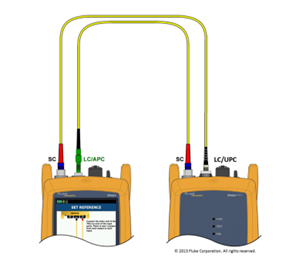
Setting the reference The leading cause of negative loss/optimistic looking results is the use of the 2-jumper reference. That’s where the reference is set using 2 jumpers and a bulkhead adapter - shown below. You may have been doing this for the past 20 years, but this reference method is incorrect for the testing of installed links.
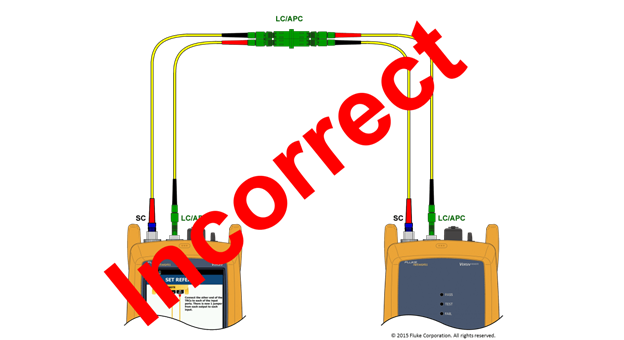
Follow these instructions and your negative losses will be a thing of the past.
- Power on the main and remote sources. Allow them to stabilize. If the instruments have been sitting in the location of your test area, 5 minutes is usually long enough. If there is a significant temperature change from where they were stored to where you are using them, you will need to allow them to stabilize for much longer. We shall check the sources for stability during this procedure.
- From the HOME screen, tap SET REF > SKIP WIZARD > NEXT.
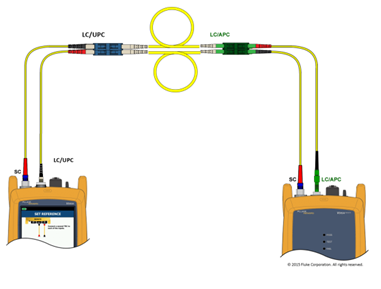
- Connect the main and remote units together: (Ensure the TRCs are laid out straight) Note: The standard NFA-LC, this input adapter on CertiFiber Pro works for both UPC and APC connectors.
- Tap SET REFERENCE.
(If you get Warning: Check fiber connections. The measured power levels are outside the range expected...... Tap OK > View Reference. Look to the fiber with the lower reference power, where -10 dBm is worse than -6 dBm. Inspect and clean the TRC. You may need to clean the OUTPUT port on your module too. Once done, press HOME and start the procedure again.) What Reference value are considered in range? Click here.
- Tap NEXT and disconnect the TRCs from the INPUT ports (never disconnect from the OUTPUT ports)
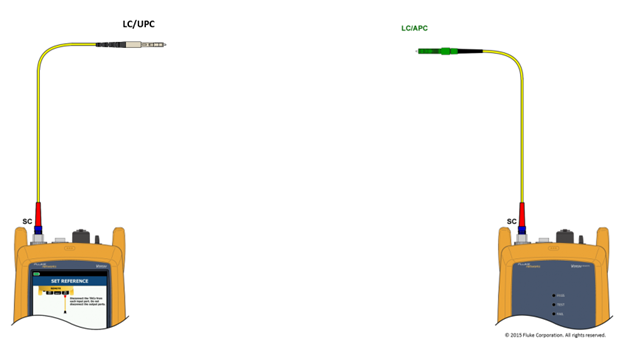
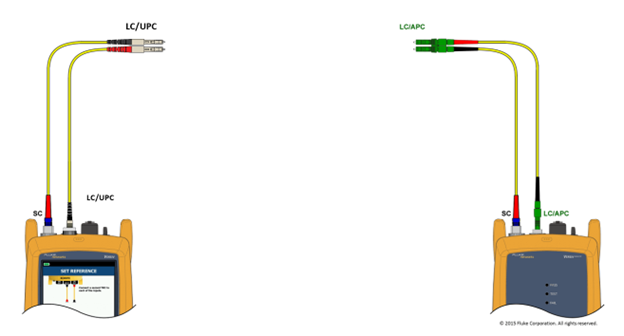
- Tap NEXT and insert your known good LC/APC to LC/APC TRC and LC/UPC to LC/UPC into the INPUT ports:
-
Press the HOME key
-
Test Reference Cord Verification – Install a high quality LC/UPC to LC/APC duplex fiber jumper that is between 2 and 5 meters in length, run a test to confirm the performance of the Test Reference Cords and confirm continuity of the "Known Good" Test Reference Cords
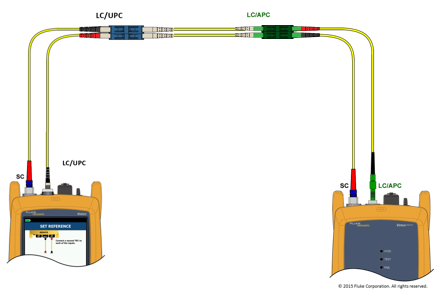
- Run the loss test that you have configured for the project.
- Ideally the absolute loss value for this verification step will be less than 0.75 dB
- Save this test with a distinct cable ID such as "TRC_Date_Time"
- Include this test result with your other results to show that you started in a good place.
-
Press the HOME key - you are now ready to test.
-
Connect to your link.
- Press TEST and in 3 seconds you will have certified both fibers at 1310 nm and 1550 nm.